
Claude Code Crash Course
A comprehensive, production-grade tutorial for mastering Claude Code in backend development with TypeScript + Express + GraphQL. Based on real-world best practices.
Table of Contents
- Introduction
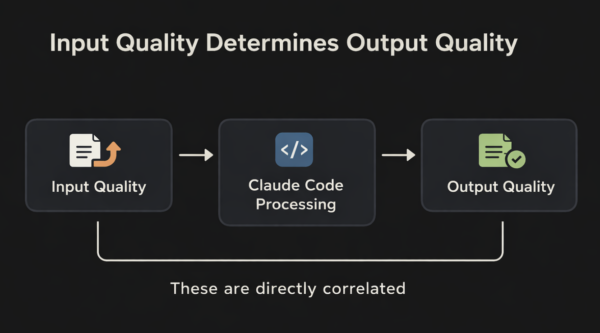
- Core Philosophy: Input Quality Determines Output Quality
- Installation and Setup
- Plan Mode and the AskUserQuestion Tool
- Build Without Ralph: Gaining Experience
- Understanding Ralph Loops
- SPECS.md and Progress.txt: Your Project Documents
- Skills, MCP and CLAUDE.md
- Context Management
- CLI Reference and Essential Commands
- Tips and Tricks: Expert-Level Practices
- Real-World Example: Express + GraphQL Backend
- Resources and Links
Models are good enough now
If your output is garbage, your input was garbage. Invest in planning.
Introduction
Claude Code is Anthropic’s agentic coding tool that lives in your terminal. Unlike traditional chatbots, Claude Code can read files, execute commands, make changes, and work autonomously on problems. This tutorial focuses on maximizing your effectiveness as a backend developer building production systems.
Target Audience: Senior backend developers familiar with:
- TypeScript/Node.js ecosystems
- Express.js and GraphQL (Apollo Server)
- Testing frameworks (Jest, Supertest, Testcontainers)
- CI/CD pipelines and Docker
- PostgreSQL with native pg client
- Dependency injection pattern (DI Container)
- Observability (OpenTelemetry, Prometheus)
Key Insight: Models have become extraordinarily capable. If you’re producing «AI garbage,» it’s because your inputs were garbage. The era of blaming the model is over—invest in quality inputs.
Core Philosophy
The Software Engineering Mindset
Think of communicating with Claude Code like communicating with a human engineer:
| ❌ Sparse Instructions | ✅ Precise Instructions |
|---|---|
| «Build me an auth system» | «Build a JWT-based auth system with refresh tokens, password hashing with argon2, rate limiting (100 req/15min), and PostgreSQL user storage with UserRepository receiving db pool via constructor injection, registered in the DI container» |
| «Add an API endpoint» | «Add a POST /api/v1/users endpoint that validates input with Zod, creates a user via UserService (resolved from DI container), returns 201 with the user DTO, and handles duplicate email errors with 409» |
| «Fix the bug» | «Login fails after session timeout. Check the token refresh logic in src/auth/. Write a failing test first, then fix it» |
Features, Not Products
When planning, think in features, not products. A product is abstract; features are concrete and testable.
Product: "A user management API"
    │
    ├── Feature 1: User registration with email verification
    │   └── Test: Email sent, user status = pending
    │
    ├── Feature 2: JWT authentication with refresh tokens
    │   └── Test: Token issued, refresh works, expired = 401
    │
    ├── Feature 3: Password reset flow
    │   └── Test: Reset email sent, new password works
    │
    └── Feature 4: Role-based authorization
        └── Test: Admin routes blocked for regular users
Installation and Setup
Install Claude Code
macOS/Linux/WSL:
curl -fsSL https://claude.ai/install.sh | bashWindows PowerShell:
irm https://claude.ai/install.ps1 | iexHomebrew (macOS):
brew install claude-codeVerify Installation
claude --versionStart Using Claude Code
cd your-project
claude
You’ll be prompted to log in on first use. Requires a Claude subscription (Pro, Max, Teams, or Enterprise).
Terminal Recommendation
While the default terminal works, consider using a modern terminal like:
Plan Mode and the AskUserQuestion Tool
Why Default Planning is Insufficient
When you enter Claude Code and use basic planning:
claude
# Press Shift+Tab to enter Plan Mode
> I want to build a GraphQL API for user management. Please help me create a plan.
Claude will ask 2-3 generic questions and start building. This is insufficient for production systems.
Default planning:
- Asks superficial questions
- Assumes things about architecture, error handling, database design
- Doesn’t probe edge cases or tradeoffs
- Results in rework when the finished product doesn’t match expectations
Deep Planning with AskUserQuestion
The AskUserQuestion tool forces Claude to interview you exhaustively before writing code. This is the most underutilized feature in Claude Code.
claude --permission-mode planThen use this prompt:
Read any existing plan files and interview me in detail using the AskUserQuestion tool
about literally anything: technical implementation, UI/UX, concerns, tradeoffs, etc.

Ask about:
- Database schema design and relationships
- Error handling strategies
- Authentication/authorization patterns
- API versioning approach
- Testing requirements
- Performance considerations
- Deployment constraints

Keep interviewing until we've covered everything, then write a complete specification
in SPECS.md
What AskUserQuestion Actually Asks
Round 1: Core Workflow and Technical Foundations
- What’s your ideal workflow for this API from request to response?
- How should the app handle API costs and rate limiting?
- What database and hosting approach do you prefer?
- How important is offline/local processing vs cloud-only?
Round 2: Architecture and Patterns
- Do you want to use dependency injection with a custom DI container?
- Which validation library? (Zod, Joi, class-validator)
- How should errors be formatted for GraphQL clients?
- Logging strategy? (Pino, Winston, structured JSON)
Round 3: Specific Implementation Details
- JWT expiration times for access/refresh tokens?
- Password hash rounds for bcrypt?
- Rate limiting windows and thresholds?
- Database connection pool sizes?
Practical Example: GraphQL API Project
Let’s walk through planning a real TypeScript + Express + GraphQL backend:
claude --permission-mode planYour Initial Prompt:
I want to build a production-ready GraphQL API for a SaaS application
with user management, authentication, and basic CRUD operations.

Interview me using AskUserQuestion about:
- Tech stack decisions (TypeScript, Express, Apollo Server)
- Database design (PostgreSQL with native pg client)
- Authentication patterns (JWT with refresh tokens)
- Authorization (RBAC)
- Dependency injection pattern (custom DI Container)
- Error handling and validation
- Testing strategy (Jest, Supertest)
- Deployment considerations

Be thorough. I'd rather spend 30 minutes planning than 3 hours fixing.
Example Interview Flow:
Claude: What GraphQL server implementation do you prefer?
Options:
1. Apollo Server (most popular, rich ecosystem, subscriptions, caching)
2. express-graphql (lightweight, direct Express integration)
3. Mercurius (Fastify-based, high performance)
4. GraphQL Yoga (modern, Envelop-based)

You: Apollo Server - rich ecosystem, plugins, subscriptions, and Apollo Studio

Claude: For dependency injection, how do you want to handle
service resolution?
Options:
1. Custom DI Container (lightweight, type-safe, no decorators)
2. InversifyJS (full-featured IoC container)
3. Awilix (function-based, no decorators)
4. Manual DI (constructor injection, no container)

You: Custom DI Container - lightweight, type-safe, no external dependencies

Claude: How should GraphQL errors be formatted?
Options:
1. Standard GraphQL errors only
2. Custom error codes with extensions
3. Full error class hierarchy (AuthError, ValidationError, etc.)
4. Union types for expected errors (Result pattern)

You: Custom error codes with extensions - clients need to
handle different error types programmatically
After 15-20 questions, Claude produces a complete SPECS.md:
# User Management GraphQL API - SPECS
## Tech Stack
- Runtime: Node.js 20+
- Language: TypeScript 5+
- Framework: Express.js + Apollo Server
- Database: PostgreSQL 15+ (native pg client)
- DI Pattern: Custom DI Container (type-safe singleton/factory)
- Validation: Zod
- Authentication: jose (JWT), argon2 (password hashing)
- GraphQL Perf: DataLoader (N+1 prevention), graphql-scalars
- GraphQL Security: graphql-armor (query depth/complexity)
- Security: Helmet, CORS, express-rate-limit, Compression
- Logging: Pino
- Observability: OpenTelemetry (tracing), prom-client (metrics)
- Testing: Jest + Supertest + jest-mock-extended + Faker + Testcontainers
## Architecture Decisions
- Dependency injection via custom DI container
- Constructor injection (no decorators)
- Repositories receive dependencies via constructor, registered as singletons in DI container
## Authentication Flow
- Access Token: 15 minutes expiration, stored in memory
- Refresh Token: 7 days expiration, stored in httpOnly cookie
- Password: bcrypt with 12 rounds
## Error Handling
- Custom error classes extending ApolloError
- Error codes: AUTH_FAILED, VALIDATION_ERROR, NOT_FOUND, FORBIDDEN
- All errors logged with correlation ID (Pino)
- Apollo Server plugin for error formatting
## Features
- [ ] User registration with email validation
- [ ] Login/logout with JWT
- [ ] Token refresh endpoint
- [ ] User CRUD operations
- [ ] Role-based authorization (USER, ADMIN)
- [ ] Rate limiting (100 requests/15 minutes)
## Testing Requirements
- Unit tests for services (mocked repositories)
- Integration tests for resolvers (test database)
- E2E tests for critical flows (auth, user creation)
Build Without Ralph: Gaining Experience
«If you haven’t built anything, deployed anything, there’s not a URL that I myself can click on that you built—you don’t deserve to use Ralph.»
Why Build Manually First?
Learn to drive before buying a self-driving car:
- Understand the process: See how Claude interprets your instructions
- Develop debugging intuition: Know when Claude goes off track
- Learn to course correct: Master
Esc,/rewind, and/clear - Build quality instincts: Recognize good vs bad AI-generated code
Feature-by-Feature Development
With your SPECS.md ready, build one feature at a time:
claudeFeature 1: Database Schema
Let's start with the database schema from our SPECS.md.

Create the SQL migration for the users table with:
- id (UUID, primary key)
- email (VARCHAR(255), unique, not null)
- password (VARCHAR(255), not null)
- name (VARCHAR(100), not null)
- role (user_role enum, not null, default 'user')
- is_active (boolean, not null, default true)
- created_at (TIMESTAMPTZ, default NOW())
- updated_at (TIMESTAMPTZ, default NOW())

Put it in migrations/001_create_users_table.sql following our project structure.
Also create the TypeScript model in src/models/user.model.ts
After Claude generates:
Run the SQL migration against local PostgreSQL to verify the schema works.
Show me the created table structure.
Feature 2: User Repository
Now create the UserRepository in src/repositories/user.repository.ts

It should have methods:
- findById(id: string): Promise<User | null>
- findByEmail(email: string): Promise<User | null>
- create(data: CreateUserDTO): Promise<User>
- update(id: string, data: UpdateUserDTO): Promise<User>
- delete(id: string): Promise<void>

Receive the database pool and logger via constructor injection.
Register UserRepository as a singleton in src/container/index.ts.
Extend BaseRepository if available (it also uses constructor injection).
Then verify:
Write a unit test for UserRepository in tests/integration/repositories/
Mock the database connection.
Run the test.
Test-Driven Approach
For each feature:
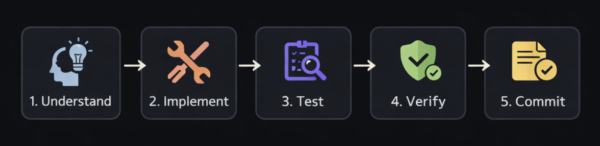
Example test-first workflow:
# In Claude Code
> Write a failing test for the AuthService.login method.
> It should:
>   - Return tokens for valid credentials
>   - Throw AuthError for invalid password
>   - Throw NotFoundError for non-existent user
>
> Put the test in tests/unit/services/auth.service.test.ts
> Use Jest and jest-mock-extended for proper mocking.
# Claude writes the test, you verify it fails
> Run the test to confirm it fails for the right reasons.
# Now implement
> Now implement AuthService.login to make all tests pass.
> Follow our error handling patterns from SPECS.md.
# Verify
> Run the tests again. Fix any failures.
Understanding Ralph Loops
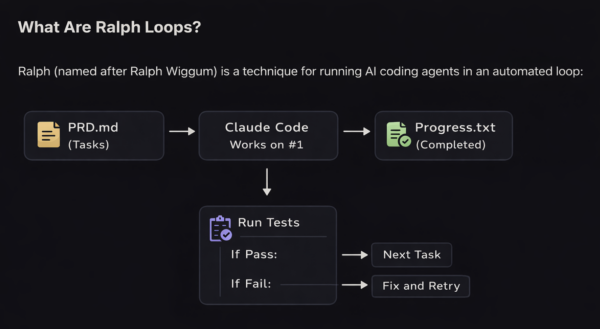
The loop:
- Reads task list from SPECS.md
- Works on first incomplete task
- Writes tests for the feature
- Runs linting
- Documents progress in progress.txt
- Repeats until all tasks are complete
When to Use Ralph
| ✅ Use Ralph When | ❌ Don’t Use Ralph When |
|---|---|
| You have a battle-tested SPECS | You’re still exploring the idea |
| Tasks are clearly defined | Tasks are vague or ambiguous |
| You’ve built similar things before | This is your first project |
| You can verify results automatically | Verification requires manual review |
| You’re comfortable with the codebase | You’re learning the codebase |
Configuring Ralph with Tests and Linting
A proper Ralph setup includes verification at every step:
# SPECS.md Structure for Ralph
## Summary
Build a minimal TypeScript Express server with GraphQL endpoints.
## Tasks
- [ ] Initialize project with TypeScript config
- [ ] Set up Express server with health endpoint
- [ ] Configure Apollo Server with basic schema
- [ ] Set up custom DI container
- [ ] Implement User type and queries
- [ ] Add createUser mutation with validation
- [ ] Write integration tests for GraphQL endpoints
- [ ] Add authentication middleware
- [ ] Document API in README
## Verification Requirements
After each task:
1. Run \`npm run type-check\`
2. Run \`npm run lint\`
3. Run \`npm run test\`
4. Everything must pass before moving to the next task
Ralph Loop Script Concept:
#!/bin/bash
# Simplified Ralph loop concept
while [ "\$(grep -c '\- \[ \]' SPECS.md)" -gt 0 ]; do
    # Get first incomplete task
    TASK=\$(grep -m1 '\- \[ \]' SPECS.md)

    # Run Claude on the task
    claude -p "Complete this task from SPECS.md: \$TASK.
               After completing, run tests and lint.
               If tests pass, mark the task as complete in SPECS.md
               and document in progress.txt.
               If tests fail, fix the issues."

    # Claude handles the rest internally
doneNote: Claude Code has a built-in Ralph plugin, but as the inventor suggests, building your own understanding first is more valuable than plug-and-play automation.
SPECS.md and Progress.txt
Your Project Documents
SPECS.md: The Single Source of Truth
# Project: User GraphQL API
## Summary
Production-ready GraphQL API for user management with JWT auth.
## Tech Stack
- **Runtime**: **Node.js 20+** — LTS stability, native `fetch`, modern Web APIs
- **Language**: **TypeScript 5+** — strict mode, latest type system features
- **Framework**: **Express + Apollo Server** — mature ecosystem, GraphQL subscriptions
- **Database**: **PostgreSQL 15+** — JSONB support, full-text search
- **DB Client**: **pg (node-postgres)** — full control, no ORM abstraction
- **DI Pattern**: **Custom DI Container** — type-safe, lightweight, no decorators
- **Validation**: **Zod** — runtime validation + static typing
- **Auth**: **jose (JWT) + argon2** — modern crypto, Web Crypto API, memory-hard hashing
- **GraphQL Performance**: **DataLoader** — batching and N+1 prevention
- **GraphQL Security**: **graphql-armor** — depth and complexity limits
- **Security**: **Helmet, CORS, express-rate-limit** — secure headers and rate limiting
- **Logging**: **Pino** — fast, structured JSON logs
- **Observability**: **OpenTelemetry, prom-client** — distributed tracing and metrics
- **Testing**: **Jest + Supertest + Testcontainers** — integration tests with real databases
## Architecture
src/
├── config/         # Environment, database, logger, telemetry
├── container/      # Custom DI container with type-safe resolvers
├── controllers/    # HTTP controllers (REST endpoints)
├── graphql/        # Apollo Server: schema, resolvers, context, loaders, plugins
│   └── loaders/    # DataLoaders for N+1 prevention
├── middleware/     # Auth, rate-limit, error handler
├── models/         # Database models and entities
├── repositories/   # Data access layer (constructor injection)
├── services/       # Business logic (constructor injection)
├── types/          # TypeScript definitions
├── utils/          # Helpers, errors
└── validators/     # Zod schemas
## Tasks
- [x] Project initialization with TypeScript
- [x] Database schema and migrations
- [x] Custom DI container setup
- [ ] User repository with constructor injection (registered in DI container)
- [ ] Auth service with constructor injection (registered in DI container)
- [ ] Apollo Server: GraphQL schema and resolvers (services resolved via DI context)
- [ ] Integration tests (using resolvers from DI container)
- [ ] Rate limiting middleware
- [ ] Docker configuration
## Constraints
- Response time: < 200ms for 95th percentile
- Test coverage: > 80%
- Zero critical security vulnerabilities
Progress.txt: Execution Log
# Progress Log

## 2026-01-29 10:30 - Project Initialization
✅ Created package.json with dependencies
✅ Configured tsconfig.json (strict mode)
✅ Jest configuration established
✅ Created src/ directory structure
Files: package.json, tsconfig.json, jest.config.ts

## 2026-01-29 11:15 - Database Schema
✅ Defined users table with SQL migration
✅ Created TypeScript User model
✅ Migration tested against local PostgreSQL
Files: src/models/user.model.ts, migrations/001_create_users_table.sql

## 2026-01-29 14:00 - User Repository with DI [IN PROGRESS]
⏳ Implementing CRUD operations with constructor injection
⏳ Registering UserRepository as singleton in DI container
⏳ Writing integration tests using resolvers.db()
Current file: src/repositories/user.repository.ts
Skills, MCP and CLAUDE.md
CLAUDE.md Configuration
Create a CLAUDE.md at the root of your project for persistent context:
# CLAUDE.md - Claude Code Project Configuration

> **This file is automatically loaded by Claude Code at the start of every session.**
> It provides essential context about project conventions, commands, and best practices.

---

## Quick Reference

### Build & Development Commands

```bash
npm run dev              # Start development server (tsx watch)
npm run build            # TypeScript compilation
npm run start            # Run production build
npm run type-check       # TypeScript type checking only
```

### Testing Commands

```bash
npm run test             # Run all tests
npm run test:watch       # Tests in watch mode
npm run test:coverage    # Tests with coverage report
npm run test:unit        # Unit tests only
npm run test:integration # Integration tests only
npm run test:e2e         # E2E tests only
npm test -- -t "name"    # Run single test by name
```

### Code Quality Commands

```bash
npm run lint             # ESLint check
npm run lint:fix         # ESLint auto-fix
npm run format           # Prettier formatting
```

### Database Commands

```bash
npm run db:migrate       # Run SQL migrations
npm run db:seed          # Seed with test data
```

### Docker Commands

```bash
npm run docker:dev       # Start dev environment with Docker Compose
npm run docker:down      # Stop and remove containers
```

---

## Core Philosophy

**Input Quality = Output Quality**

- Provide precise, detailed instructions (not vague requests)
- Think in **features**, not products (features are concrete and testable)
- Use the `AskUserQuestion` tool for thorough planning before coding
- Verify everything with tests, linting, and type checks

---

## Tech Stack

| Category | Technology | Notes |
|----------|------------|-------|
| Runtime | Node.js 20+ | LTS, native fetch |
| Language | TypeScript 5+ | Strict mode enabled |
| Framework | Express.js | HTTP layer |
| API Layer | Apollo Server (GraphQL) | Rich ecosystem, subscriptions |
| GraphQL Perf | DataLoader | N+1 prevention, batching |
| GraphQL Security | @escape.tech/graphql-armor | Query depth/complexity limits |
| DI Pattern | Custom DI Container | Type-safe singleton/factory, no decorators |
| Validation | Zod | Runtime + static types |
| Authentication | jose (JWT), argon2 | Modern JWT, memory-hard hashing |
| Security | Helmet, CORS, express-rate-limit | Secure headers, rate limiting |
| Performance | Compression | Response compression |
| Logging | Pino | Fast, structured JSON |
| Observability | OpenTelemetry, prom-client | Distributed tracing, metrics |
| Database | PostgreSQL 15+ | Native pg client |
| Type-Safe SQL | Kysely (optional) | Query builder |
| Testing | Jest, Supertest, jest-mock-extended, Faker, Testcontainers | Real DB in tests |
| Container | Docker | Multi-stage builds |

---

## Project Structure

```
src/
├── config/                 # Environment, database, logger, telemetry
│   ├── index.ts           # Zod-validated environment config
│   ├── database.ts        # PostgreSQL pool, transactions
│   └── logger.ts          # Pino logger setup
├── container/              # Dependency injection container
│   └── index.ts           # Type-safe DI with singleton/factory patterns
├── controllers/            # HTTP request handlers (REST endpoints)
├── graphql/                # GraphQL layer
│   ├── schema/            # Type definitions (SDL or code-first)
│   ├── resolvers/         # Query and mutation implementations
│   ├── loaders/           # DataLoaders for N+1 prevention
│   └── context.ts         # Request context with services and loaders
├── middleware/             # Express middleware
│   ├── auth.middleware.ts
│   ├── error-handler.middleware.ts
│   ├── validation.middleware.ts
│   └── request-logger.middleware.ts
├── models/                 # Database models and entities
├── repositories/           # Data access layer (pure SQL, no business logic)
├── services/               # Business logic layer
├── types/                  # TypeScript type definitions
├── utils/                  # Utility functions, custom errors
│   └── errors.ts          # AppError, ValidationError, NotFoundError, etc.
├── validators/             # Zod validation schemas
├── app.ts                  # Express app setup
└── server.ts               # Server entry point with graceful shutdown

tests/
├── unit/                   # Unit tests (mock dependencies)
├── integration/            # Integration tests (test database)
├── e2e/                    # End-to-end tests (full server)
├── fixtures/               # Test data factories
├── mocks/                  # Mock implementations
└── setup.ts                # Jest setup

docker/
├── Dockerfile              # Production multi-stage build
├── Dockerfile.dev          # Development with hot reload
└── docker-compose.yml      # Full dev environment

migrations/
└── *.sql                   # PostgreSQL migrations
```

---

## Architecture Rules

### Dependency Injection Principles

1. **Constructor Injection Only** → All dependencies are received via constructor parameters
2. **No Direct Instantiation** → Never use `new` for services/repositories in business code; always resolve from the DI container
3. **Container Manages Lifecycle** → Singletons (stateless services, repositories) and factories (request-scoped) are registered in `src/container/index.ts`
4. **Depend on Concrete Types** → TypeScript uses concrete classes (not interfaces) for DI; mocking in tests is done via `jest-mock-extended`

### Layer Responsibilities

1. **Resolvers/Controllers** → Receive services via DI context; call Services, never Repositories directly
2. **Services** → Business logic; receive repositories and other services via constructor injection
3. **Repositories** → Pure data access; receive database pool and logger via constructor injection
4. **Middleware** → Cross-cutting concerns; resolve services from DI container via `resolvers` helper

### Dependency Injection Pattern

Use **constructor injection** without decorators:

```typescript
// Services receive dependencies via constructor
export class UserService {
  constructor(
    private readonly userRepository: UserRepository,
    private readonly logger: Logger
  ) {}
}

// Container registers singletons and factories
container.singleton(
  'userService',
  () => new UserService(
    container.resolve('userRepository'),
    container.resolve('logger')
  )
);
```

### Error Handling

All errors should extend `AppError` from `src/utils/errors.ts`:

```typescript
// Custom error classes
throw new NotFoundError('User');           // 404
throw new ValidationError('message', []);  // 400
throw new UnauthorizedError('message');    // 401
throw new ForbiddenError('message');       // 403
throw new ConflictError('message');        // 409
```

---

## Code Style Guidelines

### TypeScript

- Use **ES modules** (import/export), not CommonJS
- Prefer **named exports** over default exports
- All async functions must have **explicit return types**
- Use TypeScript **strict mode** (already configured)

### Validation

- Use **Zod** for all external input validation
- Validate at boundaries (controllers, resolvers, middleware)
- Transform and sanitize inputs in schemas

### Database

- All queries go through **repositories** (resolved from DI container)
- Use **parameterized queries** (prevent SQL injection)
- Use **transactions** for multi-step operations
- Prefer **DataLoader** for batched queries in GraphQL

### Testing

- **Unit tests**: Mock external dependencies with jest-mock-extended
- **Integration tests**: Use test database (Testcontainers recommended)
- **E2E tests**: Full server bootstrap
- Prefer running **individual tests** during development
- Target **80%+ coverage**

---

## Git Workflow

### Branch Naming

```
feature/   # New features
fix/       # Bug fixes
chore/     # Maintenance tasks
docs/      # Documentation updates
```

### Commit Messages (Conventional Commits)

```
feat: add user registration endpoint
fix: resolve token refresh race condition
docs: update API documentation
chore: upgrade dependencies
test: add auth service unit tests
```

### Pre-commit Checklist

```bash
npm run type-check && npm run lint && npm run test
```

---

## Environment Variables

Required in `.env`:

```env
# Server
NODE_ENV=development|test|production
PORT=3000

# Database
DB_HOST=localhost
DB_PORT=5432
DB_NAME=appdb
DB_USER=postgres
DB_PASSWORD=postgres
DB_POOL_MIN=2
DB_POOL_MAX=10

# JWT (minimum 32 characters each)
JWT_SECRET=your-super-secret-jwt-key-min-32-chars
JWT_REFRESH_SECRET=your-super-secret-refresh-key-min-32
JWT_EXPIRES_IN=15m
JWT_REFRESH_EXPIRES_IN=7d

# Security
CORS_ORIGINS=http://localhost:3000,http://localhost:5173
RATE_LIMIT_WINDOW_MS=900000
RATE_LIMIT_MAX=100

# Logging
LOG_LEVEL=debug|info|warn|error
```

---

## Planning Best Practices

### Use AskUserQuestion for Deep Planning

Before building any significant feature, use thorough planning:

```
Interview me using AskUserQuestion about:
- Database schema design and relationships
- Error handling strategies
- Authentication/authorization patterns
- API versioning approach
- Testing requirements
- Performance considerations
- Deployment constraints

Be thorough. Ask about tradeoffs. I'd rather answer 20 questions than rework code.
```

### SPECS.md Structure

Create a `SPECS.md` for project specifications:

```markdown
# Project: [Name]

## Summary
[One paragraph description]

## Tech Stack
[Table of technologies with justifications]

## Architecture
[Directory structure and layer responsibilities]

## Tasks
- [ ] Task 1
- [ ] Task 2

## Constraints
- Response time: < 200ms for 95th percentile
- Test coverage: > 80%
```

### Progress Tracking

Use `progress.txt` to document execution:

```text
## YYYY-MM-DD HH:MM - [Feature Name]
✅ Completed item 1
✅ Completed item 2
⏳ In progress: item 3
Files: file1.ts, file2.ts
```

---

## Context Management (50% Rule)

Claude's context degrades as it fills. Best practices:

1. **Start fresh sessions** for unrelated tasks
2. **Use `/clear`** between unrelated work
3. **Use `/compact`** when context grows large
4. **Delegate research** to subagents
5. **Watch for degradation**: Claude forgetting instructions, declining quality

### Useful Commands

| Command | Purpose |
|---------|---------|
| `/clear` | Reset context completely |
| `/compact [focus]` | Summarize and compress context |
| `/rewind` | Restore previous checkpoint |
| `Esc` | Stop current action |
| `Esc Esc` | Open rewind menu |

---

## Verification Checklist

After every feature implementation:

- [ ] `npm run type-check` passes
- [ ] `npm run lint` passes
- [ ] `npm run test` passes (or relevant test file)
- [ ] Manual verification if applicable
- [ ] Code follows architecture rules
- [ ] Error handling is complete
- [ ] Documentation updated if needed

---

## Security Checklist

- [ ] Use Helmet for security headers
- [ ] Configure CORS properly
- [ ] Hash passwords with argon2 (not bcrypt)
- [ ] Use short-lived JWTs (15m access, 7d refresh)
- [ ] Validate all inputs with Zod
- [ ] Sanitize error messages in production
- [ ] Use parameterized queries only
- [ ] Implement rate limiting
- [ ] Limit GraphQL query depth/complexity

---

## Quick Patterns

### Creating a New Service

```typescript
// 1. Define types in src/types/
// 2. Create Zod validators in src/validators/
// 3. Create repository in src/repositories/
// 4. Create service in src/services/
// 5. Register in DI container (src/container/index.ts)
// 6. Add resolver or controller
// 7. Write tests (unit + integration)
```

### Adding a GraphQL Resolver

1. Define schema types in `src/graphql/schema/`
2. Implement resolver in `src/graphql/resolvers/`
3. Add validation with Zod schemas
4. Create DataLoader if needed for batching
5. Write integration tests in `tests/integration/graphql/`

### Fixing a Bug

1. Write a **failing test** that reproduces the bug
2. Implement the fix
3. Verify test passes
4. Run full test suite
5. Commit with `fix:` prefix

---

## Resources

- [Apollo Server Docs](https://www.apollographql.com/docs/apollo-server/)
- [Zod Documentation](https://zod.dev/)
- [Jest Documentation](https://jestjs.io/docs/getting-started)
- [Testcontainers Guide](https://testcontainers.com/guides/getting-started-with-testcontainers-for-nodejs/)
- [OpenTelemetry JS](https://opentelemetry.io/docs/languages/js/)
- [jose JWT Library](https://github.com/panva/jose)
- [DataLoader](https://github.com/graphql/dataloader)
- [graphql-armor](https://escape.tech/graphql-armor/)

---

*Remember: Models are good enough now. If your output is garbage, your input was garbage. Invest in planning.*
Skills for Reusable Workflows
Create skills in .claude/skills/ for common tasks:
---
name: typescript-express-graphql-backend
description: Build production-ready TypeScript Node.js backend services with Express and Apollo Server GraphQL, implementing dependency injection pattern, JWT authentication, PostgreSQL integration, Docker containerization, and comprehensive testing. Use when creating scalable APIs, GraphQL servers, or microservices with enterprise-grade patterns.
---
# TypeScript Express GraphQL Backend Patterns
Comprehensive guidance for building scalable, maintainable, and production-ready Node.js backend applications with Express, GraphQL, dependency injection pattern, and modern DevOps practices.
## When to Use This Skill
- Building REST APIs or GraphQL servers with TypeScript
- Creating microservices with Express and GraphQL
- Implementing JWT-based authentication and authorization
- Designing applications with dependency injection pattern
- Setting up PostgreSQL database integration
- Containerizing applications with Docker
- Writing comprehensive tests (unit, integration, E2E)
- Implementing middleware patterns and error handling
## Tech Stack Overview
| Category | Technology |
|----------|------------|
| Runtime | Node.js 20+ |
| Language | TypeScript 5+ |
| Framework | Express.js |
| API Layer | Apollo Server (GraphQL) |
| GraphQL Perf | DataLoader (N+1 prevention), graphql-scalars |
| GraphQL Security | @escape.tech/graphql-armor (query depth/complexity) |
| DI Pattern | Custom DI Container (type-safe singleton/factory) |
| Validation | Zod |
| Authentication | jose (JWT), argon2 (password hashing) |
| Security | Helmet, CORS, express-rate-limit |
| Performance | Compression |
| Logging | Pino |
| Observability | OpenTelemetry (tracing), prom-client (metrics) |
| Database | PostgreSQL |
| Type-Safe SQL | Kysely (optional) |
| Testing | Jest, Supertest, jest-mock-extended, Faker, @testcontainers/postgresql |
| Container | Docker |
## Project Structure
```
src/
├── config/ # Configuration and environment
│ ├── index.ts
│ ├── database.ts
│ └── logger.ts
├── container/ # Dependency injection container
│ └── index.ts
├── controllers/ # HTTP request handlers (REST endpoints)
│ └── health.controller.ts
├── graphql/ # GraphQL layer
│ ├── schema/
│ │ ├── index.ts
│ │ ├── user.schema.ts
│ │ └── auth.schema.ts
│ ├── resolvers/
│ │ ├── index.ts
│ │ ├── user.resolver.ts
│ │ └── auth.resolver.ts
│ └── context.ts
├── middleware/ # Express middleware
│ ├── auth.middleware.ts
│ ├── error-handler.middleware.ts
│ ├── validation.middleware.ts
│ └── request-logger.middleware.ts
├── models/ # Database models and entities
│ └── user.model.ts
├── repositories/ # Data access layer
│ ├── base.repository.ts
│ └── user.repository.ts
├── services/ # Business logic layer
│ ├── user.service.ts
│ └── auth.service.ts
├── types/ # TypeScript type definitions
│ ├── index.ts
│ ├── user.types.ts
│ ├── auth.types.ts
│ └── express.d.ts
├── utils/ # Utility functions and helpers
│ ├── errors.ts
│ ├── response.ts
│ └── password.ts
├── validators/ # Zod validation schemas
│ ├── user.validator.ts
│ └── auth.validator.ts
├── app.ts # Express app setup
└── server.ts # Server entry point
tests/
├── unit/
│ ├── services/
│ └── utils/
├── integration/
│ ├── repositories/
│ └── graphql/
├── e2e/
│ └── api.test.ts
├── fixtures/
│ └── user.fixture.ts
├── mocks/
│ └── repositories.mock.ts
└── setup.ts
docker/
├── Dockerfile
├── Dockerfile.dev
└── docker-compose.yml
migrations/
└── 001_create_users_table.sql
```
## Configuration
### Environment Configuration
```typescript
// src/config/index.ts
import { z } from 'zod';
const envSchema = z.object({
NODE_ENV: z.enum(['development', 'test', 'production']).default('development'),
PORT: z.string().transform(Number).default('3000'),
// Database
DB_HOST: z.string(),
DB_PORT: z.string().transform(Number).default('5432'),
DB_NAME: z.string(),
DB_USER: z.string(),
DB_PASSWORD: z.string(),
DB_POOL_MIN: z.string().transform(Number).default('2'),
DB_POOL_MAX: z.string().transform(Number).default('10'),
// JWT
JWT_SECRET: z.string().min(32),
JWT_EXPIRES_IN: z.string().default('15m'),
JWT_REFRESH_SECRET: z.string().min(32),
JWT_REFRESH_EXPIRES_IN: z.string().default('7d'),
// Security
CORS_ORIGINS: z.string().transform((val) => val.split(',')),
RATE_LIMIT_WINDOW_MS: z.string().transform(Number).default('900000'),
RATE_LIMIT_MAX: z.string().transform(Number).default('100'),
// Logging
LOG_LEVEL: z.enum(['fatal', 'error', 'warn', 'info', 'debug', 'trace']).default('info'),
});
const parseEnv = () => {
const result = envSchema.safeParse(process.env);
if (!result.success) {
console.error('❌ Invalid environment variables:');
console.error(result.error.format());
process.exit(1);
}
return result.data;
};
export const config = parseEnv();
export type Config = typeof config;
```
### Logger Configuration
```typescript
// src/config/logger.ts
import pino from 'pino';
import { config } from './index';
export const logger = pino({
level: config.LOG_LEVEL,
transport: config.NODE_ENV === 'development'
? {
target: 'pino-pretty',
options: {
colorize: true,
translateTime: 'SYS:standard',
ignore: 'pid,hostname',
},
}
: undefined,
base: {
env: config.NODE_ENV,
},
redact: ['req.headers.authorization', 'password', 'token'],
});
export type Logger = typeof logger;
```
### Database Configuration
```typescript
// src/config/database.ts
import { Pool, PoolConfig, PoolClient } from 'pg';
import { config } from './index';
import { logger } from './logger';
const poolConfig: PoolConfig = {
host: config.DB_HOST,
port: config.DB_PORT,
database: config.DB_NAME,
user: config.DB_USER,
password: config.DB_PASSWORD,
min: config.DB_POOL_MIN,
max: config.DB_POOL_MAX,
idleTimeoutMillis: 30000,
connectionTimeoutMillis: 5000,
};
export const pool = new Pool(poolConfig);
pool.on('connect', () => {
logger.debug('New database connection established');
});
pool.on('error', (err) => {
logger.error({ err }, 'Unexpected database pool error');
});
export const getClient = async (): Promise => {
return pool.connect();
};
export const query = async (
text: string,
params?: any[]
): Promise => {
const start = Date.now();
const result = await pool.query(text, params);
const duration = Date.now() - start;
logger.debug({ query: text, duration, rows: result.rowCount }, 'Query executed');
return result.rows;
};
export const transaction = async (
callback: (client: PoolClient) => Promise
): Promise => {
const client = await pool.connect();
try {
await client.query('BEGIN');
const result = await callback(client);
await client.query('COMMIT');
return result;
} catch (error) {
await client.query('ROLLBACK');
throw error;
} finally {
client.release();
}
};
export const closeDatabase = async (): Promise => {
await pool.end();
logger.info('Database connections closed');
};
export const healthCheck = async (): Promise => {
try {
await pool.query('SELECT 1');
return true;
} catch {
return false;
}
};
```
## Dependency Injection Container
### Custom DI Container Pattern
A lightweight, type-safe DI container without external dependencies or decorators.
```typescript
// src/container/index.ts
import { Pool } from 'pg';
import { pool } from '../config/database';
import { logger, Logger } from '../config/logger';
import { config, Config } from '../config';
// Repositories
import { UserRepository } from '../repositories/user.repository';
// Services
import { UserService } from '../services/user.service';
import { AuthService } from '../services/auth.service';
// Controllers
import { UserController } from '../controllers/user.controller';
// Type-safe DI Container
class Container {
private instances = new Map();
register(key: string, factory: () => T): void {
this.instances.set(key, factory);
}
resolve(key: string): T {
const factory = this.instances.get(key);
if (!factory) {
throw new Error(`No factory registered for ${key}`);
}
return factory();
}
singleton(key: string, factory: () => T): void {
let instance: T;
this.instances.set(key, () => {
if (!instance) {
instance = factory();
}
return instance;
});
}
}
export const container = new Container();
// Register infrastructure (singletons)
container.singleton('db', () => pool);
container.singleton('logger', () => logger);
container.singleton('config', () => config);
// Register repositories (singletons - stateless, reusable)
container.singleton(
'userRepository',
() => new UserRepository(
container.resolve('db'),
container.resolve('logger')
)
);
// Register services (singletons - stateless business logic)
container.singleton(
'userService',
() => new UserService(
container.resolve('userRepository'),
container.resolve('logger')
)
);
container.singleton(
'authService',
() => new AuthService(
container.resolve('userRepository'),
container.resolve('config'),
container.resolve('logger')
)
);
// Register controllers (factory - new instance per request if needed)
container.register(
'userController',
() => new UserController(container.resolve('userService'))
);
// Type-safe resolver helpers
export const resolvers = {
db: () => container.resolve('db'),
logger: () => container.resolve('logger'),
config: () => container.resolve('config'),
userRepository: () => container.resolve('userRepository'),
userService: () => container.resolve('userService'),
authService: () => container.resolve('authService'),
userController: () => container.resolve('userController'),
};
```
### Constructor Injection (No Decorators)
Classes receive dependencies through constructor parameters - pure DI without decorators.
```typescript
// src/repositories/user.repository.ts
import { Pool } from 'pg';
import { Logger } from '../config/logger';
import { User, CreateUserDTO, UpdateUserDTO } from '../types/user.types';
import { BaseRepository } from './base.repository';
export class UserRepository extends BaseRepository {
constructor(
private readonly db: Pool,
private readonly logger: Logger
) {
super(db, logger, 'users');
}
async findById(id: string): Promise {
const result = await this.db.query(
'SELECT * FROM users WHERE id = $1',
[id]
);
return result.rows[0] || null;
}
async findByEmail(email: string): Promise {
const result = await this.db.query(
'SELECT * FROM users WHERE email = $1',
[email]
);
return result.rows[0] || null;
}
// ... other methods
}
```
```typescript
// src/services/auth.service.ts
import { UserRepository } from '../repositories/user.repository';
import { Config } from '../config';
import { Logger } from '../config/logger';
import { AuthTokens, LoginInput } from '../types/auth.types';
export class AuthService {
constructor(
private readonly userRepository: UserRepository,
private readonly config: Config,
private readonly logger: Logger
) {}
async login(input: LoginInput): Promise {
// Implementation uses this.userRepository, this.config, this.logger
}
// ... other methods
}
```
```typescript
// src/controllers/user.controller.ts
import { Request, Response, NextFunction } from 'express';
import { UserService } from '../services/user.service';
export class UserController {
constructor(private readonly userService: UserService) {}
async getUser(req: Request, res: Response, next: NextFunction): Promise {
try {
const user = await this.userService.getUserById(req.params.id);
res.json({ status: 'success', data: user });
} catch (error) {
next(error);
}
}
async createUser(req: Request, res: Response, next: NextFunction): Promise {
try {
const user = await this.userService.createUser(req.body);
res.status(201).json({ status: 'success', data: user });
} catch (error) {
next(error);
}
}
}
```
## Type Definitions
### User Types
```typescript
// src/types/user.types.ts
export interface User {
id: string;
email: string;
name: string;
role: UserRole;
isActive: boolean;
createdAt: Date;
updatedAt: Date;
}
export interface UserEntity extends User {
password: string;
}
export type UserRole = 'user' | 'admin' | 'moderator';
export interface CreateUserDTO {
email: string;
password: string;
name: string;
role?: UserRole;
}
export interface UpdateUserDTO {
email?: string;
name?: string;
role?: UserRole;
isActive?: boolean;
}
export type UserWithoutPassword = Omit;
```
### Auth Types
```typescript
// src/types/auth.types.ts
import { UserRole } from './user.types';
export interface JWTPayload {
userId: string;
email: string;
role: UserRole;
}
export interface TokenPair {
accessToken: string;
refreshToken: string;
}
export interface LoginDTO {
email: string;
password: string;
}
export interface RegisterDTO {
email: string;
password: string;
name: string;
}
export interface AuthResult {
user: {
id: string;
email: string;
name: string;
role: UserRole;
};
tokens: TokenPair;
}
export interface RefreshTokenDTO {
refreshToken: string;
}
```
### Express Type Extensions
```typescript
// src/types/express.d.ts
import { JWTPayload } from './auth.types';
declare global {
namespace Express {
interface Request {
user?: JWTPayload;
requestId?: string;
}
}
}
export {};
```
## Custom Errors
```typescript
// src/utils/errors.ts
export class AppError extends Error {
public readonly statusCode: number;
public readonly isOperational: boolean;
public readonly code: string;
constructor(
message: string,
statusCode: number = 500,
code: string = 'INTERNAL_ERROR',
isOperational: boolean = true
) {
super(message);
this.statusCode = statusCode;
this.code = code;
this.isOperational = isOperational;
Object.setPrototypeOf(this, AppError.prototype);
Error.captureStackTrace(this, this.constructor);
}
}
export class ValidationError extends AppError {
public readonly errors: Array<{ field: string; message: string }>;
constructor(message: string, errors: Array<{ field: string; message: string }> = []) {
super(message, 400, 'VALIDATION_ERROR');
this.errors = errors;
}
}
export class NotFoundError extends AppError {
constructor(resource: string = 'Resource') {
super(\`\${resource} not found\`, 404, 'NOT_FOUND');
}
}
export class UnauthorizedError extends AppError {
constructor(message: string = 'Authentication required') {
super(message, 401, 'UNAUTHORIZED');
}
}
export class ForbiddenError extends AppError {
constructor(message: string = 'Access denied') {
super(message, 403, 'FORBIDDEN');
}
}
export class ConflictError extends AppError {
constructor(message: string) {
super(message, 409, 'CONFLICT');
}
}
export class TooManyRequestsError extends AppError {
constructor(message: string = 'Too many requests') {
super(message, 429, 'TOO_MANY_REQUESTS');
}
}
export const isAppError = (error: unknown): error is AppError => {
return error instanceof AppError;
};
```
## Validators (Zod)
### User Validators
```typescript
// src/validators/user.validator.ts
import { z } from 'zod';
export const userRoleSchema = z.enum(['user', 'admin', 'moderator']);
export const createUserSchema = z.object({
email: z
.string()
.email('Invalid email format')
.max(255, 'Email must not exceed 255 characters')
.transform((val) => val.toLowerCase().trim()),
password: z
.string()
.min(8, 'Password must be at least 8 characters')
.max(72, 'Password must not exceed 72 characters')
.regex(
/^(?=.*[a-z])(?=.*[A-Z])(?=.*\d)(?=.*[@\$!%*?&])[A-Za-z\d@\$!%*?&]/,
'Password must contain uppercase, lowercase, number, and special character'
),
name: z
.string()
.min(1, 'Name is required')
.max(100, 'Name must not exceed 100 characters')
.trim(),
role: userRoleSchema.optional().default('user'),
});
export const updateUserSchema = z.object({
email: z
.string()
.email('Invalid email format')
.max(255)
.transform((val) => val.toLowerCase().trim())
.optional(),
name: z
.string()
.min(1)
.max(100)
.trim()
.optional(),
role: userRoleSchema.optional(),
isActive: z.boolean().optional(),
});
export const userIdParamSchema = z.object({
id: z.string().uuid('Invalid user ID format'),
});
export const paginationSchema = z.object({
page: z.coerce.number().int().positive().default(1),
limit: z.coerce.number().int().positive().max(100).default(20),
sortBy: z.string().optional().default('createdAt'),
sortOrder: z.enum(['asc', 'desc']).optional().default('desc'),
});
export type CreateUserInput = z.infer;
export type UpdateUserInput = z.infer;
export type PaginationInput = z.infer;
```
### Auth Validators
```typescript
// src/validators/auth.validator.ts
import { z } from 'zod';
export const loginSchema = z.object({
email: z
.string()
.email('Invalid email format')
.transform((val) => val.toLowerCase().trim()),
password: z.string().min(1, 'Password is required'),
});
export const registerSchema = z.object({
email: z
.string()
.email('Invalid email format')
.max(255)
.transform((val) => val.toLowerCase().trim()),
password: z
.string()
.min(8, 'Password must be at least 8 characters')
.max(72, 'Password must not exceed 72 characters')
.regex(
/^(?=.*[a-z])(?=.*[A-Z])(?=.*\d)(?=.*[@\$!%*?&])[A-Za-z\d@\$!%*?&]/,
'Password must contain uppercase, lowercase, number, and special character'
),
name: z
.string()
.min(1, 'Name is required')
.max(100)
.trim(),
});
export const refreshTokenSchema = z.object({
refreshToken: z.string().min(1, 'Refresh token is required'),
});
export type LoginInput = z.infer;
export type RegisterInput = z.infer;
export type RefreshTokenInput = z.infer;
```
## Repository Layer (DI Pattern)
### Base Repository (Constructor Injection)
Base repository receives `db` pool and `logger` via constructor - all subclasses inherit this DI pattern.
```typescript
// src/repositories/base.repository.ts
import { Pool, PoolClient, QueryResult } from 'pg';
import { Logger } from '../config/logger';
export interface PaginationOptions {
page: number;
limit: number;
sortBy?: string;
sortOrder?: 'asc' | 'desc';
}
export interface PaginatedResult {
data: T[];
pagination: {
page: number;
limit: number;
total: number;
totalPages: number;
};
}
export abstract class BaseRepository {
constructor(
protected readonly db: Pool,
protected readonly logger: Logger,
protected readonly tableName: string
) {}
protected async query(
text: string,
params?: any[]
): Promise {
const start = Date.now();
const result = await this.db.query(text, params);
const duration = Date.now() - start;
this.logger.debug(
{ query: text, duration, rows: result.rowCount },
'Query executed'
);
return result.rows;
}
protected async queryOne(
text: string,
params?: any[]
): Promise {
const rows = await this.query(text, params);
return rows[0] || null;
}
protected async execute(
text: string,
params?: any[]
): Promise {
const result = await this.db.query(text, params);
return result.rowCount ?? 0;
}
protected async withTransaction(
callback: (client: PoolClient) => Promise
): Promise {
const client = await this.db.connect();
try {
await client.query('BEGIN');
const result = await callback(client);
await client.query('COMMIT');
return result;
} catch (error) {
await client.query('ROLLBACK');
throw error;
} finally {
client.release();
}
}
async findById(id: string): Promise {
return this.queryOne(
\`SELECT * FROM \${this.tableName} WHERE id = \$1\`,
[id]
);
}
async findAll(options: PaginationOptions): Promise> {
const { page, limit, sortBy = 'created_at', sortOrder = 'desc' } = options;
const offset = (page - 1) * limit;
const allowedSortColumns = ['created_at', 'updated_at', 'name', 'email'];
const safeSort = allowedSortColumns.includes(sortBy) ? sortBy : 'created_at';
const safeOrder = sortOrder === 'asc' ? 'ASC' : 'DESC';
const [data, countResult] = await Promise.all([
this.query(
\`SELECT * FROM \${this.tableName}
ORDER BY \${safeSort} \${safeOrder}
LIMIT \$1 OFFSET \$2\`,
[limit, offset]
),
this.queryOne<{ count: string }>(
\`SELECT COUNT(*) as count FROM \${this.tableName}\`
),
]);
const total = parseInt(countResult?.count || '0', 10);
return {
data,
pagination: {
page,
limit,
total,
totalPages: Math.ceil(total / limit),
},
};
}
async delete(id: string): Promise {
const rowCount = await this.execute(
\`DELETE FROM \${this.tableName} WHERE id = \$1\`,
[id]
);
return rowCount > 0;
}
}
```
### User Repository
Repositories receive dependencies via constructor - registered as singletons in the DI container.
```typescript
// src/repositories/user.repository.ts
import { Pool } from 'pg';
import { Logger } from '../config/logger';
import { BaseRepository } from './base.repository';
import { UserEntity, CreateUserDTO, UpdateUserDTO } from '../types/user.types';
// Dependencies injected via constructor - resolved from container
export class UserRepository extends BaseRepository {
constructor(
private readonly db: Pool,
private readonly logger: Logger
) {
super(db, logger, 'users');
}
async create(data: CreateUserDTO & { password: string }): Promise {
const result = await this.queryOne(
\`INSERT INTO users (email, password, name, role)
VALUES (\$1, \$2, \$3, \$4)
RETURNING *\`,
[data.email, data.password, data.name, data.role || 'user']
);
if (!result) {
throw new Error('Failed to create user');
}
return result;
}
async findByEmail(email: string): Promise {
return this.queryOne(
'SELECT * FROM users WHERE email = \$1',
[email.toLowerCase()]
);
}
async update(id: string, data: UpdateUserDTO): Promise {
const fields: string[] = [];
const values: any[] = [];
let paramIndex = 1;
if (data.email !== undefined) {
fields.push(\`email = \$\${paramIndex++}\`);
values.push(data.email.toLowerCase());
}
if (data.name !== undefined) {
fields.push(\`name = \$\${paramIndex++}\`);
values.push(data.name);
}
if (data.role !== undefined) {
fields.push(\`role = \$\${paramIndex++}\`);
values.push(data.role);
}
if (data.isActive !== undefined) {
fields.push(\`is_active = \$\${paramIndex++}\`);
values.push(data.isActive);
}
if (fields.length === 0) {
return this.findById(id);
}
fields.push(\`updated_at = CURRENT_TIMESTAMP\`);
values.push(id);
return this.queryOne(
\`UPDATE users
SET \${fields.join(', ')}
WHERE id = \$\${paramIndex}
RETURNING *\`,
values
);
}
async existsByEmail(email: string): Promise {
const result = await this.queryOne<{ exists: boolean }>(
'SELECT EXISTS(SELECT 1 FROM users WHERE email = \$1) as exists',
[email.toLowerCase()]
);
return result?.exists ?? false;
}
async findActiveUsers(): Promise {
return this.query(
'SELECT * FROM users WHERE is_active = true ORDER BY created_at DESC'
);
}
async updatePassword(id: string, hashedPassword: string): Promise {
const rowCount = await this.execute(
'UPDATE users SET password = \$1, updated_at = CURRENT_TIMESTAMP WHERE id = \$2',
[hashedPassword, id]
);
return rowCount > 0;
}
}
```
## Service Layer
### Password Utility (argon2)
```typescript
// src/utils/password.ts
import argon2 from 'argon2';
// Argon2id - winner of Password Hashing Competition (PHC)
// Memory-hard, resistant to GPU/ASIC attacks
const ARGON2_OPTIONS: argon2.Options = {
type: argon2.argon2id,
memoryCost: 65536, // 64 MB
timeCost: 3, // iterations
parallelism: 4,
};
export const hashPassword = async (password: string): Promise => {
return argon2.hash(password, ARGON2_OPTIONS);
};
export const comparePassword = async (
password: string,
hash: string
): Promise => {
return argon2.verify(hash, password);
};
```
### User Service
Services receive dependencies via constructor - registered in the DI container.
```typescript
// src/services/user.service.ts
import { UserRepository } from '../repositories/user.repository';
import { Logger } from '../config/logger';
import {
User,
CreateUserDTO,
UpdateUserDTO,
UserWithoutPassword,
} from '../types/user.types';
import { PaginationOptions, PaginatedResult } from '../repositories/base.repository';
import { NotFoundError, ConflictError } from '../utils/errors';
import { hashPassword } from '../utils/password';
// Dependencies injected via constructor - no decorators needed
export class UserService {
constructor(
private readonly userRepository: UserRepository,
private readonly logger: Logger
) {}
private sanitizeUser(user: User & { password?: string }): UserWithoutPassword {
const { password, ...sanitized } = user;
return sanitized as UserWithoutPassword;
}
async createUser(data: CreateUserDTO): Promise {
this.logger.info({ email: data.email }, 'Creating new user');
// Check if email already exists
const exists = await this.userRepository.existsByEmail(data.email);
if (exists) {
throw new ConflictError('Email already registered');
}
// Hash password
const hashedPassword = await hashPassword(data.password);
// Create user
const user = await this.userRepository.create({
...data,
password: hashedPassword,
});
this.logger.info({ userId: user.id }, 'User created successfully');
return this.sanitizeUser(user);
}
async getUserById(id: string): Promise {
const user = await this.userRepository.findById(id);
if (!user) {
throw new NotFoundError('User');
}
return this.sanitizeUser(user);
}
async getUserByEmail(email: string): Promise {
const user = await this.userRepository.findByEmail(email);
return user ? this.sanitizeUser(user) : null;
}
async getUsers(options: PaginationOptions): Promise> {
const result = await this.userRepository.findAll(options);
return {
...result,
data: result.data.map((user) => this.sanitizeUser(user)),
};
}
async updateUser(id: string, data: UpdateUserDTO): Promise {
this.logger.info({ userId: id }, 'Updating user');
// Check if user exists
const existingUser = await this.userRepository.findById(id);
if (!existingUser) {
throw new NotFoundError('User');
}
// Check email uniqueness if updating email
if (data.email && data.email !== existingUser.email) {
const emailExists = await this.userRepository.existsByEmail(data.email);
if (emailExists) {
throw new ConflictError('Email already in use');
}
}
const updatedUser = await this.userRepository.update(id, data);
if (!updatedUser) {
throw new NotFoundError('User');
}
this.logger.info({ userId: id }, 'User updated successfully');
return this.sanitizeUser(updatedUser);
}
async deleteUser(id: string): Promise {
this.logger.info({ userId: id }, 'Deleting user');
const deleted = await this.userRepository.delete(id);
if (!deleted) {
throw new NotFoundError('User');
}
this.logger.info({ userId: id }, 'User deleted successfully');
}
}
```
### Auth Service (jose - Modern JWT)
Auth service uses constructor injection for all dependencies.
```typescript
// src/services/auth.service.ts
import * as jose from 'jose';
import { UserRepository } from '../repositories/user.repository';
import { Config } from '../config';
import { Logger } from '../config/logger';
import {
JWTPayload,
TokenPair,
AuthResult,
LoginDTO,
RegisterDTO,
} from '../types/auth.types';
import { UnauthorizedError, ConflictError } from '../utils/errors';
import { hashPassword, comparePassword } from '../utils/password';
// Dependencies injected via constructor - resolved from DI container
// jose uses Web Crypto API - modern, typed, and secure
export class AuthService {
private readonly accessSecret: Uint8Array;
private readonly refreshSecret: Uint8Array;
constructor(
private readonly userRepository: UserRepository,
private readonly config: Config,
private readonly logger: Logger
) {
// Convert secrets to Uint8Array for jose
this.accessSecret = new TextEncoder().encode(this.config.JWT_SECRET);
this.refreshSecret = new TextEncoder().encode(this.config.JWT_REFRESH_SECRET);
}
async register(data: RegisterDTO): Promise {
this.logger.info({ email: data.email }, 'Registering new user');
// Check if email exists
const exists = await this.userRepository.existsByEmail(data.email);
if (exists) {
throw new ConflictError('Email already registered');
}
// Hash password and create user
const hashedPassword = await hashPassword(data.password);
const user = await this.userRepository.create({
...data,
password: hashedPassword,
role: 'user',
});
// Generate tokens
const tokens = this.generateTokenPair({
userId: user.id,
email: user.email,
role: user.role,
});
this.logger.info({ userId: user.id }, 'User registered successfully');
return {
user: {
id: user.id,
email: user.email,
name: user.name,
role: user.role,
},
tokens,
};
}
async login(data: LoginDTO): Promise {
this.logger.info({ email: data.email }, 'User login attempt');
// Find user by email
const user = await this.userRepository.findByEmail(data.email);
if (!user) {
this.logger.warn({ email: data.email }, 'Login failed: user not found');
throw new UnauthorizedError('Invalid credentials');
}
// Check if user is active
if (!user.isActive) {
this.logger.warn({ userId: user.id }, 'Login failed: user inactive');
throw new UnauthorizedError('Account is deactivated');
}
// Verify password
const isValid = await comparePassword(data.password, user.password);
if (!isValid) {
this.logger.warn({ userId: user.id }, 'Login failed: invalid password');
throw new UnauthorizedError('Invalid credentials');
}
// Generate tokens
const tokens = this.generateTokenPair({
userId: user.id,
email: user.email,
role: user.role,
});
this.logger.info({ userId: user.id }, 'User logged in successfully');
return {
user: {
id: user.id,
email: user.email,
name: user.name,
role: user.role,
},
tokens,
};
}
async refreshTokens(refreshToken: string): Promise {
try {
const { payload } = await jose.jwtVerify(
refreshToken,
this.refreshSecret
);
// Verify user still exists and is active
const user = await this.userRepository.findById(payload.userId as string);
if (!user || !user.isActive) {
throw new UnauthorizedError('Invalid refresh token');
}
// Generate new token pair
return this.generateTokenPair({
userId: user.id,
email: user.email,
role: user.role,
});
} catch (error) {
if (error instanceof UnauthorizedError) {
throw error;
}
this.logger.warn({ error }, 'Token refresh failed');
throw new UnauthorizedError('Invalid refresh token');
}
}
async verifyAccessToken(token: string): Promise {
try {
const { payload } = await jose.jwtVerify(token, this.accessSecret);
return payload as unknown as JWTPayload;
} catch (error) {
throw new UnauthorizedError('Invalid access token');
}
}
private async generateTokenPair(payload: JWTPayload): Promise {
const accessToken = await new jose.SignJWT(payload as unknown as jose.JWTPayload)
.setProtectedHeader({ alg: 'HS256' })
.setIssuedAt()
.setExpirationTime(this.config.JWT_EXPIRES_IN)
.sign(this.accessSecret);
const refreshToken = await new jose.SignJWT(payload as unknown as jose.JWTPayload)
.setProtectedHeader({ alg: 'HS256' })
.setIssuedAt()
.setExpirationTime(this.config.JWT_REFRESH_EXPIRES_IN)
.sign(this.refreshSecret);
return { accessToken, refreshToken };
}
}
```
## Middleware
### Authentication Middleware
Middleware uses the DI container's `resolvers` to access services.
```typescript
// src/middleware/auth.middleware.ts
import { Request, Response, NextFunction } from 'express';
import { resolvers } from '../container';
import { UnauthorizedError, ForbiddenError } from '../utils/errors';
import { UserRole } from '../types/user.types';
// Resolve AuthService from DI container
export const authenticate = async (
req: Request,
_res: Response,
next: NextFunction
): Promise => {
try {
const authHeader = req.headers.authorization;
if (!authHeader?.startsWith('Bearer ')) {
throw new UnauthorizedError('No token provided');
}
const token = authHeader.substring(7);
// Get AuthService from DI container
const authService = resolvers.authService();
const payload = await authService.verifyAccessToken(token);
req.user = payload;
next();
} catch (error) {
next(error instanceof UnauthorizedError ? error : new UnauthorizedError('Invalid token'));
}
};
export const authorize = (...allowedRoles: UserRole[]) => {
return (req: Request, _res: Response, next: NextFunction): void => {
if (!req.user) {
return next(new UnauthorizedError('Authentication required'));
}
if (!allowedRoles.includes(req.user.role)) {
return next(new ForbiddenError('Insufficient permissions'));
}
next();
};
};
export const optionalAuth = (
req: Request,
_res: Response,
next: NextFunction
): void => {
const authHeader = req.headers.authorization;
if (!authHeader?.startsWith('Bearer ')) {
return next();
}
try {
const token = authHeader.substring(7);
const authService = resolvers.authService();
req.user = authService.verifyAccessToken(token);
} catch {
// Ignore invalid tokens for optional auth
}
next();
};
```
### Validation Middleware
```typescript
// src/middleware/validation.middleware.ts
import { Request, Response, NextFunction } from 'express';
import { AnyZodObject, ZodError } from 'zod';
import { ValidationError } from '../utils/errors';
type ValidateTarget = 'body' | 'query' | 'params';
interface ValidateOptions {
body?: AnyZodObject;
query?: AnyZodObject;
params?: AnyZodObject;
}
export const validate = (schemas: ValidateOptions) => {
return async (req: Request, _res: Response, next: NextFunction): Promise => {
try {
const errors: Array<{ field: string; message: string }> = [];
for (const [target, schema] of Object.entries(schemas)) {
if (schema) {
const result = await schema.safeParseAsync(req[target as ValidateTarget]);
if (!result.success) {
errors.push(
...result.error.errors.map((err) => ({
field: \`\${target}.\${err.path.join('.')}\`,
message: err.message,
}))
);
} else {
// Replace with parsed/transformed values
req[target as ValidateTarget] = result.data;
}
}
}
if (errors.length > 0) {
throw new ValidationError('Validation failed', errors);
}
next();
} catch (error) {
if (error instanceof ValidationError) {
next(error);
} else if (error instanceof ZodError) {
next(
new ValidationError(
'Validation failed',
error.errors.map((err) => ({
field: err.path.join('.'),
message: err.message,
}))
)
);
} else {
next(error);
}
}
};
};
```
### Error Handler Middleware
```typescript
// src/middleware/error-handler.middleware.ts
import { Request, Response, NextFunction } from 'express';
import { AppError, ValidationError, isAppError } from '../utils/errors';
import { logger } from '../config/logger';
interface ErrorResponse {
status: 'error';
code: string;
message: string;
errors?: Array<{ field: string; message: string }>;
stack?: string;
}
export const errorHandler = (
err: Error,
req: Request,
res: Response,
_next: NextFunction
): void => {
const requestId = req.requestId;
// Log error
logger.error(
{
err,
requestId,
method: req.method,
url: req.url,
userId: req.user?.userId,
},
'Request error'
);
// Handle known application errors
if (isAppError(err)) {
const response: ErrorResponse = {
status: 'error',
code: err.code,
message: err.message,
};
if (err instanceof ValidationError) {
response.errors = err.errors;
}
res.status(err.statusCode).json(response);
return;
}
// Handle unknown errors
const statusCode = 500;
const response: ErrorResponse = {
status: 'error',
code: 'INTERNAL_ERROR',
message:
process.env.NODE_ENV === 'production'
? 'An unexpected error occurred'
: err.message,
};
// Include stack trace in development
if (process.env.NODE_ENV !== 'production') {
response.stack = err.stack;
}
res.status(statusCode).json(response);
};
export const notFoundHandler = (
req: Request,
res: Response,
_next: NextFunction
): void => {
res.status(404).json({
status: 'error',
code: 'NOT_FOUND',
message: \`Route \${req.method} \${req.path} not found\`,
});
};
```
### Request Logger Middleware
```typescript
// src/middleware/request-logger.middleware.ts
import { Request, Response, NextFunction } from 'express';
import { randomUUID } from 'crypto';
import { logger } from '../config/logger';
export const requestLogger = (
req: Request,
res: Response,
next: NextFunction
): void => {
const requestId = randomUUID();
const startTime = Date.now();
// Attach request ID
req.requestId = requestId;
res.setHeader('X-Request-ID', requestId);
// Log request
logger.info(
{
requestId,
method: req.method,
url: req.url,
query: req.query,
ip: req.ip,
userAgent: req.get('user-agent'),
},
'Incoming request'
);
// Log response on finish
res.on('finish', () => {
const duration = Date.now() - startTime;
logger.info(
{
requestId,
method: req.method,
url: req.url,
statusCode: res.statusCode,
duration: \`\${duration}ms\`,
userId: req.user?.userId,
},
'Request completed'
);
});
next();
};
```
### Rate Limiting Middleware
```typescript
// src/middleware/rate-limit.middleware.ts
import rateLimit from 'express-rate-limit';
import { TooManyRequestsError } from '../utils/errors';
import { logger } from '../config/logger';
// General API rate limiter
export const apiLimiter = rateLimit({
windowMs: 15 * 60 * 1000, // 15 minutes
max: 100, // 100 requests per window
standardHeaders: true,
legacyHeaders: false,
handler: (req, _res, _next) => {
logger.warn({ ip: req.ip, path: req.path }, 'Rate limit exceeded');
throw new TooManyRequestsError('Too many requests, please try again later');
},
});
// Strict limiter for auth endpoints
export const authLimiter = rateLimit({
windowMs: 15 * 60 * 1000, // 15 minutes
max: 5, // 5 attempts per window
standardHeaders: true,
legacyHeaders: false,
skipSuccessfulRequests: true, // Only count failed attempts
handler: (req, _res, _next) => {
logger.warn({ ip: req.ip }, 'Auth rate limit exceeded');
throw new TooManyRequestsError('Too many login attempts, please try again later');
},
});
// Strict limiter for password reset
export const passwordResetLimiter = rateLimit({
windowMs: 60 * 60 * 1000, // 1 hour
max: 3, // 3 requests per hour
standardHeaders: true,
legacyHeaders: false,
});
```
## GraphQL Layer
### DataLoader for N+1 Prevention
```typescript
// src/graphql/loaders/user.loader.ts
import DataLoader from 'dataloader';
import { Pool } from 'pg';
import { User } from '../../types/user.types';
// DataLoader batches individual findById calls into a single query
export const createUserLoader = (db: Pool) => {
return new DataLoader(async (userIds) => {
const result = await db.query(
'SELECT * FROM users WHERE id = ANY($1)',
[userIds]
);
// Map results back to the order of input IDs
const userMap = new Map(result.rows.map((user) => [user.id, user]));
return userIds.map((id) => userMap.get(id) ?? null);
});
};
// Batch load users by email
export const createUserByEmailLoader = (db: Pool) => {
return new DataLoader(async (emails) => {
const result = await db.query(
'SELECT * FROM users WHERE email = ANY($1)',
[emails]
);
const emailMap = new Map(result.rows.map((user) => [user.email, user]));
return emails.map((email) => emailMap.get(email) ?? null);
});
};
```
### GraphQL Context with DataLoaders
Context uses the DI container's `resolvers` to inject services into GraphQL resolvers.
```typescript
// src/graphql/context.ts
import { Request, Response } from 'express';
import DataLoader from 'dataloader';
import { JWTPayload } from '../types/auth.types';
import { resolvers } from '../container';
import { UserService } from '../services/user.service';
import { AuthService } from '../services/auth.service';
import { Logger } from '../config/logger';
import { createUserLoader, createUserByEmailLoader } from './loaders/user.loader';
import { User } from '../types/user.types';
export interface GraphQLContext {
req: Request;
res: Response;
user?: JWTPayload;
services: {
userService: UserService;
authService: AuthService;
};
loaders: {
userLoader: DataLoader;
userByEmailLoader: DataLoader;
};
logger: Logger;
}
export const createContext = (req: Request, res: Response): GraphQLContext => {
// DataLoaders are created per-request to enable batching within a request
// and avoid caching across different users
// Services are resolved from the DI container (singletons)
const db = resolvers.db();
return {
req,
res,
user: req.user,
services: {
// Resolve services from DI container
userService: resolvers.userService(),
authService: resolvers.authService(),
},
loaders: {
// DataLoaders use the db pool from DI container
userLoader: createUserLoader(db),
userByEmailLoader: createUserByEmailLoader(db),
},
logger: resolvers.logger(),
};
};
```
### GraphQL Schema
```typescript
// src/graphql/schema/index.ts
import {
GraphQLSchema,
GraphQLObjectType,
} from 'graphql';
import {
queryFields as userQueryFields,
mutationFields as userMutationFields
} from './user.schema';
import {
queryFields as authQueryFields,
mutationFields as authMutationFields
} from './auth.schema';
const QueryType = new GraphQLObjectType({
name: 'Query',
fields: () => ({
...userQueryFields,
...authQueryFields,
}),
});
const MutationType = new GraphQLObjectType({
name: 'Mutation',
fields: () => ({
...userMutationFields,
...authMutationFields,
}),
});
export const schema = new GraphQLSchema({
query: QueryType,
mutation: MutationType,
});
```
### User Schema
```typescript
// src/graphql/schema/user.schema.ts
import {
GraphQLObjectType,
GraphQLString,
GraphQLNonNull,
GraphQLList,
GraphQLInt,
GraphQLBoolean,
GraphQLEnumType,
GraphQLInputObjectType,
GraphQLFieldConfigMap,
} from 'graphql';
import { GraphQLContext } from '../context';
import { userResolvers } from '../resolvers/user.resolver';
export const UserRoleEnum = new GraphQLEnumType({
name: 'UserRole',
values: {
USER: { value: 'user' },
ADMIN: { value: 'admin' },
MODERATOR: { value: 'moderator' },
},
});
export const UserType = new GraphQLObjectType({
name: 'User',
fields: () => ({
id: { type: new GraphQLNonNull(GraphQLString) },
email: { type: new GraphQLNonNull(GraphQLString) },
name: { type: new GraphQLNonNull(GraphQLString) },
role: { type: new GraphQLNonNull(UserRoleEnum) },
isActive: { type: new GraphQLNonNull(GraphQLBoolean) },
createdAt: { type: new GraphQLNonNull(GraphQLString) },
updatedAt: { type: new GraphQLNonNull(GraphQLString) },
}),
});
export const PaginationInfoType = new GraphQLObjectType({
name: 'PaginationInfo',
fields: () => ({
page: { type: new GraphQLNonNull(GraphQLInt) },
limit: { type: new GraphQLNonNull(GraphQLInt) },
total: { type: new GraphQLNonNull(GraphQLInt) },
totalPages: { type: new GraphQLNonNull(GraphQLInt) },
}),
});
export const UsersConnectionType = new GraphQLObjectType({
name: 'UsersConnection',
fields: () => ({
data: { type: new GraphQLNonNull(new GraphQLList(new GraphQLNonNull(UserType))) },
pagination: { type: new GraphQLNonNull(PaginationInfoType) },
}),
});
const UpdateUserInputType = new GraphQLInputObjectType({
name: 'UpdateUserInput',
fields: () => ({
email: { type: GraphQLString },
name: { type: GraphQLString },
role: { type: UserRoleEnum },
isActive: { type: GraphQLBoolean },
}),
});
export const queryFields: GraphQLFieldConfigMap = {
user: {
type: UserType,
args: {
id: { type: new GraphQLNonNull(GraphQLString) },
},
resolve: userResolvers.getUser,
},
users: {
type: new GraphQLNonNull(UsersConnectionType),
args: {
page: { type: GraphQLInt, defaultValue: 1 },
limit: { type: GraphQLInt, defaultValue: 20 },
sortBy: { type: GraphQLString, defaultValue: 'createdAt' },
sortOrder: { type: GraphQLString, defaultValue: 'desc' },
},
resolve: userResolvers.getUsers,
},
me: {
type: UserType,
resolve: userResolvers.me,
},
};
export const mutationFields: GraphQLFieldConfigMap = {
updateUser: {
type: UserType,
args: {
id: { type: new GraphQLNonNull(GraphQLString) },
input: { type: new GraphQLNonNull(UpdateUserInputType) },
},
resolve: userResolvers.updateUser,
},
deleteUser: {
type: GraphQLBoolean,
args: {
id: { type: new GraphQLNonNull(GraphQLString) },
},
resolve: userResolvers.deleteUser,
},
};
```
### Auth Schema
```typescript
// src/graphql/schema/auth.schema.ts
import {
GraphQLObjectType,
GraphQLString,
GraphQLNonNull,
GraphQLInputObjectType,
GraphQLFieldConfigMap,
} from 'graphql';
import { GraphQLContext } from '../context';
import { UserType } from './user.schema';
import { authResolvers } from '../resolvers/auth.resolver';
export const TokensType = new GraphQLObjectType({
name: 'Tokens',
fields: () => ({
accessToken: { type: new GraphQLNonNull(GraphQLString) },
refreshToken: { type: new GraphQLNonNull(GraphQLString) },
}),
});
export const AuthResultType = new GraphQLObjectType({
name: 'AuthResult',
fields: () => ({
user: { type: new GraphQLNonNull(UserType) },
tokens: { type: new GraphQLNonNull(TokensType) },
}),
});
const RegisterInputType = new GraphQLInputObjectType({
name: 'RegisterInput',
fields: () => ({
email: { type: new GraphQLNonNull(GraphQLString) },
password: { type: new GraphQLNonNull(GraphQLString) },
name: { type: new GraphQLNonNull(GraphQLString) },
}),
});
const LoginInputType = new GraphQLInputObjectType({
name: 'LoginInput',
fields: () => ({
email: { type: new GraphQLNonNull(GraphQLString) },
password: { type: new GraphQLNonNull(GraphQLString) },
}),
});
export const queryFields: GraphQLFieldConfigMap = {};
export const mutationFields: GraphQLFieldConfigMap = {
register: {
type: new GraphQLNonNull(AuthResultType),
args: {
input: { type: new GraphQLNonNull(RegisterInputType) },
},
resolve: authResolvers.register,
},
login: {
type: new GraphQLNonNull(AuthResultType),
args: {
input: { type: new GraphQLNonNull(LoginInputType) },
},
resolve: authResolvers.login,
},
refreshTokens: {
type: new GraphQLNonNull(TokensType),
args: {
refreshToken: { type: new GraphQLNonNull(GraphQLString) },
},
resolve: authResolvers.refreshTokens,
},
};
```
### User Resolver
```typescript
// src/graphql/resolvers/user.resolver.ts
import { GraphQLContext } from '../context';
import { UnauthorizedError, ForbiddenError } from '../../utils/errors';
import { updateUserSchema, paginationSchema, userIdParamSchema } from '../../validators/user.validator';
const requireAuth = (context: GraphQLContext): void => {
if (!context.user) {
throw new UnauthorizedError('Authentication required');
}
};
const requireAdmin = (context: GraphQLContext): void => {
requireAuth(context);
if (context.user?.role !== 'admin') {
throw new ForbiddenError('Admin access required');
}
};
export const userResolvers = {
getUser: async (
_parent: any,
args: { id: string },
context: GraphQLContext
) => {
requireAuth(context);
const { id } = userIdParamSchema.parse(args);
return context.services.userService.getUserById(id);
},
getUsers: async (
_parent: any,
args: { page?: number; limit?: number; sortBy?: string; sortOrder?: string },
context: GraphQLContext
) => {
requireAdmin(context);
const pagination = paginationSchema.parse(args);
return context.services.userService.getUsers(pagination);
},
me: async (
_parent: any,
_args: any,
context: GraphQLContext
) => {
requireAuth(context);
return context.services.userService.getUserById(context.user!.userId);
},
updateUser: async (
_parent: any,
args: { id: string; input: any },
context: GraphQLContext
) => {
requireAuth(context);
const { id } = userIdParamSchema.parse({ id: args.id });
// Users can only update themselves, unless admin
if (context.user?.userId !== id && context.user?.role !== 'admin') {
throw new ForbiddenError('Cannot update other users');
}
const input = updateUserSchema.parse(args.input);
// Non-admins cannot change roles
if (input.role && context.user?.role !== 'admin') {
throw new ForbiddenError('Cannot change user role');
}
return context.services.userService.updateUser(id, input);
},
deleteUser: async (
_parent: any,
args: { id: string },
context: GraphQLContext
) => {
requireAdmin(context);
const { id } = userIdParamSchema.parse(args);
await context.services.userService.deleteUser(id);
return true;
},
};
```
### Auth Resolver
```typescript
// src/graphql/resolvers/auth.resolver.ts
import { GraphQLContext } from '../context';
import { loginSchema, registerSchema, refreshTokenSchema } from '../../validators/auth.validator';
export const authResolvers = {
register: async (
_parent: any,
args: { input: any },
context: GraphQLContext
) => {
const input = registerSchema.parse(args.input);
return context.services.authService.register(input);
},
login: async (
_parent: any,
args: { input: any },
context: GraphQLContext
) => {
const input = loginSchema.parse(args.input);
return context.services.authService.login(input);
},
refreshTokens: async (
_parent: any,
args: { refreshToken: string },
context: GraphQLContext
) => {
const { refreshToken } = refreshTokenSchema.parse(args);
return context.services.authService.refreshTokens(refreshToken);
},
};
```
## Express Application Setup
Application setup imports the DI container and uses resolvers for service access.
```typescript
// src/app.ts
import express, { Application } from 'express';
import helmet from 'helmet';
import cors from 'cors';
import compression from 'compression';
import { ApolloServer } from '@apollo/server';
import { expressMiddleware } from '@apollo/server/express4';
import { ApolloServerPluginDrainHttpServer } from '@apollo/server/plugin/drainHttpServer';
import http from 'http';
import { config } from './config';
import { schema } from './graphql/schema';
import { createContext, Context } from './graphql/context';
import { requestLogger } from './middleware/request-logger.middleware';
import { errorHandler, notFoundHandler } from './middleware/error-handler.middleware';
import { healthCheck } from './config/database';
import { resolvers } from './container';
export const createApp = async (): Promise<{ app: Application; server: ApolloServer }> => {
const app = express();
const httpServer = http.createServer(app);
// Security middleware
app.use(
helmet({
contentSecurityPolicy: config.NODE_ENV === 'production' ? undefined : false,
})
);
app.use(
cors({
origin: config.CORS_ORIGINS,
credentials: true,
methods: ['GET', 'POST', 'PUT', 'DELETE', 'OPTIONS'],
allowedHeaders: ['Content-Type', 'Authorization'],
})
);
// Compression
app.use(compression());
// Body parsing
app.use(express.json({ limit: '10mb' }));
app.use(express.urlencoded({ extended: true, limit: '10mb' }));
// Request logging
app.use(requestLogger);
// Health check endpoint
app.get('/health', async (_req, res) => {
const dbHealthy = await healthCheck();
const status = dbHealthy ? 'healthy' : 'unhealthy';
const statusCode = dbHealthy ? 200 : 503;
res.status(statusCode).json({
status,
timestamp: new Date().toISOString(),
services: {
database: dbHealthy ? 'up' : 'down',
},
});
});
// Ready check endpoint
app.get('/ready', (_req, res) => {
res.json({ status: 'ready' });
});
// Apollo Server setup
const apolloServer = new ApolloServer({
schema,
plugins: [
ApolloServerPluginDrainHttpServer({ httpServer }),
{
async requestDidStart() {
return {
async didEncounterErrors(requestContext) {
// Log errors with correlation ID
requestContext.errors?.forEach((error) => {
console.error('GraphQL Error:', {
message: error.message,
code: error.extensions?.code,
path: error.path,
});
});
},
};
},
},
],
formatError: (formattedError, error) => {
return {
message: formattedError.message,
code: formattedError.extensions?.code || 'GRAPHQL_ERROR',
locations: formattedError.locations,
path: formattedError.path,
...(config.NODE_ENV !== 'production' && {
stack: (error as Error).stack
}),
};
},
introspection: config.NODE_ENV === 'development',
});
await apolloServer.start();
// GraphQL endpoint with Apollo Server middleware
app.use(
'/graphql',
expressMiddleware(apolloServer, {
context: async ({ req, res }) => createContext(req, res, container),
})
);
// 404 handler
app.use(notFoundHandler);
// Global error handler
app.use(errorHandler);
return { app, server: apolloServer };
};
```
### Server Entry Point
```typescript
// src/server.ts
import { createApp } from './app';
import { config } from './config';
import { logger } from './config/logger';
import { closeDatabase } from './config/database';
const app = createApp();
const server = app.listen(config.PORT, () => {
logger.info(
{
port: config.PORT,
env: config.NODE_ENV,
},
'🚀 Server started'
);
});
// Graceful shutdown
const gracefulShutdown = async (signal: string) => {
logger.info({ signal }, 'Received shutdown signal');
server.close(async () => {
logger.info('HTTP server closed');
try {
await closeDatabase();
logger.info('Graceful shutdown completed');
process.exit(0);
} catch (error) {
logger.error({ error }, 'Error during graceful shutdown');
process.exit(1);
}
});
// Force shutdown after timeout
setTimeout(() => {
logger.error('Forced shutdown due to timeout');
process.exit(1);
}, 30000);
};
process.on('SIGTERM', () => gracefulShutdown('SIGTERM'));
process.on('SIGINT', () => gracefulShutdown('SIGINT'));
// Handle uncaught exceptions
process.on('uncaughtException', (error) => {
logger.fatal({ error }, 'Uncaught exception');
process.exit(1);
});
process.on('unhandledRejection', (reason, promise) => {
logger.fatal({ reason, promise }, 'Unhandled rejection');
process.exit(1);
});
```
## Docker Configuration
### Dockerfile (Production)
```dockerfile
# docker/Dockerfile
FROM node:20-alpine AS builder
WORKDIR /app
# Install dependencies
COPY package*.json ./
RUN npm ci --only=production=false
# Copy source and build
COPY tsconfig.json ./
COPY src ./src
RUN npm run build
# Production stage
FROM node:20-alpine AS production
WORKDIR /app
# Create non-root user
RUN addgroup -g 1001 -S nodejs && \
adduser -S nodejs -u 1001
# Copy production dependencies
COPY package*.json ./
RUN npm ci --only=production && npm cache clean --force
# Copy built application
COPY --from=builder /app/dist ./dist
# Set ownership
RUN chown -R nodejs:nodejs /app
USER nodejs
# Health check
HEALTHCHECK --interval=30s --timeout=10s --start-period=5s --retries=3 \
CMD wget --no-verbose --tries=1 --spider http://localhost:3000/health || exit 1
EXPOSE 3000
CMD ["node", "dist/server.js"]
```
### Dockerfile (Development)
```dockerfile
# docker/Dockerfile.dev
FROM node:20-alpine
WORKDIR /app
# Install dependencies
COPY package*.json ./
RUN npm ci
# Copy source
COPY . .
EXPOSE 3000
CMD ["npm", "run", "dev"]
```
### Docker Compose
```yaml
# docker/docker-compose.yml
version: '3.8'
services:
app:
build:
context: ..
dockerfile: docker/Dockerfile.dev
ports:
- '3000:3000'
environment:
- NODE_ENV=development
- PORT=3000
- DB_HOST=postgres
- DB_PORT=5432
- DB_NAME=appdb
- DB_USER=postgres
- DB_PASSWORD=postgres
- JWT_SECRET=your-super-secret-jwt-key-min-32-chars
- JWT_REFRESH_SECRET=your-super-secret-refresh-key-min-32
- CORS_ORIGINS=http://localhost:3000,http://localhost:5173
- LOG_LEVEL=debug
volumes:
- ../src:/app/src
- ../package.json:/app/package.json
depends_on:
postgres:
condition: service_healthy
networks:
- app-network
postgres:
image: postgres:16-alpine
ports:
- '5432:5432'
environment:
- POSTGRES_DB=appdb
- POSTGRES_USER=postgres
- POSTGRES_PASSWORD=postgres
volumes:
- postgres-data:/var/lib/postgresql/data
- ../migrations:/docker-entrypoint-initdb.d
healthcheck:
test: ['CMD-SHELL', 'pg_isready -U postgres -d appdb']
interval: 5s
timeout: 5s
retries: 5
networks:
- app-network
volumes:
postgres-data:
networks:
app-network:
driver: bridge
```
### Database Migration
```sql
-- migrations/001_create_users_table.sql
CREATE EXTENSION IF NOT EXISTS "uuid-ossp";
CREATE TYPE user_role AS ENUM ('user', 'admin', 'moderator');
CREATE TABLE users (
id UUID PRIMARY KEY DEFAULT uuid_generate_v4(),
email VARCHAR(255) NOT NULL UNIQUE,
password VARCHAR(255) NOT NULL,
name VARCHAR(100) NOT NULL,
role user_role NOT NULL DEFAULT 'user',
is_active BOOLEAN NOT NULL DEFAULT true,
created_at TIMESTAMP WITH TIME ZONE DEFAULT CURRENT_TIMESTAMP,
updated_at TIMESTAMP WITH TIME ZONE DEFAULT CURRENT_TIMESTAMP
);
CREATE INDEX idx_users_email ON users(email);
CREATE INDEX idx_users_role ON users(role);
CREATE INDEX idx_users_is_active ON users(is_active);
-- Trigger to update updated_at
CREATE OR REPLACE FUNCTION update_updated_at_column()
RETURNS TRIGGER AS \$\$
BEGIN
NEW.updated_at = CURRENT_TIMESTAMP;
RETURN NEW;
END;
\$\$ language 'plpgsql';
CREATE TRIGGER update_users_updated_at
BEFORE UPDATE ON users
FOR EACH ROW
EXECUTE FUNCTION update_updated_at_column();
```
## Testing Patterns
### Jest Configuration
```typescript
// jest.config.ts
import type { Config } from 'jest';
const config: Config = {
preset: 'ts-jest',
testEnvironment: 'node',
roots: ['/tests', '/src'],
testMatch: ['**/*.test.ts', '**/*.spec.ts'],
moduleNameMapper: {
'^@/(.*)$': '/src/$1',
},
setupFilesAfterEnv: ['/tests/setup.ts'],
collectCoverageFrom: [
'src/**/*.ts',
'!src/**/*.d.ts',
'!src/server.ts',
'!src/types/**',
],
coverageThreshold: {
global: {
branches: 80,
functions: 80,
lines: 80,
statements: 80,
},
},
coverageReporters: ['text', 'lcov', 'html'],
verbose: true,
testTimeout: 30000,
};
export default config;
```
### Test Setup
```typescript
// tests/setup.ts
import { container } from '../src/container';
// Clear container before each test
beforeEach(() => {
jest.clearAllMocks();
});
// Global test timeout
jest.setTimeout(30000);
// Suppress console during tests
if (process.env.SUPPRESS_LOGS === 'true') {
global.console = {
...console,
log: jest.fn(),
debug: jest.fn(),
info: jest.fn(),
warn: jest.fn(),
};
}
```
### Test Fixtures
```typescript
// tests/fixtures/user.fixture.ts
import { faker } from '@faker-js/faker';
import { User, UserEntity, CreateUserDTO, UserRole } from '../../src/types/user.types';
export const createUserFixture = (overrides: Partial = {}): User => ({
id: faker.string.uuid(),
email: faker.internet.email().toLowerCase(),
name: faker.person.fullName(),
role: 'user' as UserRole,
isActive: true,
createdAt: new Date(),
updatedAt: new Date(),
...overrides,
});
export const createUserEntityFixture = (overrides: Partial = {}): UserEntity => ({
...createUserFixture(),
password: '\$2b\$12\$hashedpassword',
...overrides,
});
export const createUserDTOFixture = (overrides: Partial = {}): CreateUserDTO => ({
email: faker.internet.email().toLowerCase(),
password: 'ValidP@ss123',
name: faker.person.fullName(),
...overrides,
});
```
### Mock Repositories
```typescript
// tests/mocks/repositories.mock.ts
import { mock, MockProxy } from 'jest-mock-extended';
import { UserRepository } from '../../src/repositories/user.repository';
import { Pool } from 'pg';
import { Logger } from '../../src/config/logger';
export const createMockUserRepository = (): MockProxy => {
return mock();
};
export const createMockPool = (): MockProxy => {
return mock();
};
export const createMockLogger = (): MockProxy => {
return mock();
};
```
### Unit Tests
With DI pattern, unit tests inject mock dependencies directly via constructor.
```typescript
// tests/unit/services/user.service.test.ts
import { MockProxy } from 'jest-mock-extended';
import { UserService } from '../../../src/services/user.service';
import { UserRepository } from '../../../src/repositories/user.repository';
import { Logger } from '../../../src/config/logger';
import { createMockUserRepository, createMockLogger } from '../../mocks/repositories.mock';
import { createUserEntityFixture, createUserDTOFixture } from '../../fixtures/user.fixture';
import { NotFoundError, ConflictError } from '../../../src/utils/errors';
import * as passwordUtils from '../../../src/utils/password';
jest.mock('../../../src/utils/password');
describe('UserService', () => {
let userService: UserService;
let mockUserRepository: MockProxy;
let mockLogger: MockProxy;
beforeEach(() => {
// Create mock dependencies
mockUserRepository = createMockUserRepository();
mockLogger = createMockLogger();
// Inject mocks via constructor - same pattern as DI container
userService = new UserService(mockUserRepository, mockLogger);
(passwordUtils.hashPassword as jest.Mock).mockResolvedValue('hashedPassword');
});
describe('createUser', () => {
it('should create a new user successfully', async () => {
const dto = createUserDTOFixture();
const createdUser = createUserEntityFixture({ email: dto.email, name: dto.name });
mockUserRepository.existsByEmail.mockResolvedValue(false);
mockUserRepository.create.mockResolvedValue(createdUser);
const result = await userService.createUser(dto);
expect(result).not.toHaveProperty('password');
expect(result.email).toBe(dto.email);
expect(mockUserRepository.existsByEmail).toHaveBeenCalledWith(dto.email);
expect(mockUserRepository.create).toHaveBeenCalled();
});
it('should throw ConflictError if email exists', async () => {
const dto = createUserDTOFixture();
mockUserRepository.existsByEmail.mockResolvedValue(true);
await expect(userService.createUser(dto)).rejects.toThrow(ConflictError);
});
});
describe('getUserById', () => {
it('should return user without password', async () => {
const user = createUserEntityFixture();
mockUserRepository.findById.mockResolvedValue(user);
const result = await userService.getUserById(user.id);
expect(result).not.toHaveProperty('password');
expect(result.id).toBe(user.id);
});
it('should throw NotFoundError if user not found', async () => {
mockUserRepository.findById.mockResolvedValue(null);
await expect(userService.getUserById('non-existent')).rejects.toThrow(NotFoundError);
});
});
describe('deleteUser', () => {
it('should delete user successfully', async () => {
mockUserRepository.delete.mockResolvedValue(true);
await expect(userService.deleteUser('user-id')).resolves.not.toThrow();
});
it('should throw NotFoundError if user not found', async () => {
mockUserRepository.delete.mockResolvedValue(false);
await expect(userService.deleteUser('non-existent')).rejects.toThrow(NotFoundError);
});
});
});
```
### Auth Service Tests
```typescript
// tests/unit/services/auth.service.test.ts
import { MockProxy } from 'jest-mock-extended';
import { AuthService } from '../../../src/services/auth.service';
import { UserRepository } from '../../../src/repositories/user.repository';
import { Config } from '../../../src/config';
import { Logger } from '../../../src/config/logger';
import { createMockUserRepository, createMockLogger } from '../../mocks/repositories.mock';
import { createUserEntityFixture } from '../../fixtures/user.fixture';
import { UnauthorizedError, ConflictError } from '../../../src/utils/errors';
import * as passwordUtils from '../../../src/utils/password';
jest.mock('../../../src/utils/password');
describe('AuthService', () => {
let authService: AuthService;
let mockUserRepository: MockProxy;
let mockLogger: MockProxy;
let mockConfig: Config;
beforeEach(() => {
mockUserRepository = createMockUserRepository();
mockLogger = createMockLogger();
mockConfig = {
JWT_SECRET: 'test-secret-key-with-32-characters!',
JWT_REFRESH_SECRET: 'test-refresh-secret-key-32-chars!',
JWT_EXPIRES_IN: '15m',
JWT_REFRESH_EXPIRES_IN: '7d',
} as Config;
authService = new AuthService(mockUserRepository, mockConfig, mockLogger);
(passwordUtils.hashPassword as jest.Mock).mockResolvedValue('hashedPassword');
(passwordUtils.comparePassword as jest.Mock).mockResolvedValue(true);
});
describe('login', () => {
it('should return tokens and user on successful login', async () => {
const user = createUserEntityFixture();
mockUserRepository.findByEmail.mockResolvedValue(user);
const result = await authService.login({
email: user.email,
password: 'password',
});
expect(result.user.id).toBe(user.id);
expect(result.tokens.accessToken).toBeDefined();
expect(result.tokens.refreshToken).toBeDefined();
});
it('should throw UnauthorizedError for invalid credentials', async () => {
mockUserRepository.findByEmail.mockResolvedValue(null);
await expect(
authService.login({ email: 'test@test.com', password: 'wrong' })
).rejects.toThrow(UnauthorizedError);
});
it('should throw UnauthorizedError for inactive user', async () => {
const user = createUserEntityFixture({ isActive: false });
mockUserRepository.findByEmail.mockResolvedValue(user);
await expect(
authService.login({ email: user.email, password: 'password' })
).rejects.toThrow(UnauthorizedError);
});
});
describe('register', () => {
it('should register a new user successfully', async () => {
const newUser = createUserEntityFixture();
mockUserRepository.existsByEmail.mockResolvedValue(false);
mockUserRepository.create.mockResolvedValue(newUser);
const result = await authService.register({
email: 'new@test.com',
password: 'ValidP@ss123',
name: 'Test User',
});
expect(result.user).toBeDefined();
expect(result.tokens).toBeDefined();
});
it('should throw ConflictError if email exists', async () => {
mockUserRepository.existsByEmail.mockResolvedValue(true);
await expect(
authService.register({
email: 'existing@test.com',
password: 'ValidP@ss123',
name: 'Test User',
})
).rejects.toThrow(ConflictError);
});
});
});
```
### Integration Tests
```typescript
// tests/integration/graphql/auth.graphql.test.ts
import request from 'supertest';
import { Application } from 'express';
import { createApp } from '../../../src/app';
import { resolvers } from '../../../src/container';
import { createUserEntityFixture } from '../../fixtures/user.fixture';
import { hashPassword } from '../../../src/utils/password';
// Note: Tests access db pool via DI container's resolvers for consistency
describe('Auth GraphQL Integration', () => {
let app: Application;
let db: ReturnType;
beforeAll(async () => {
app = createApp();
db = resolvers.db();
});
beforeEach(async () => {
await db.query('DELETE FROM users');
});
afterAll(async () => {
await db.end();
});
describe('Mutation: register', () => {
const REGISTER_MUTATION = \`
mutation Register(\$input: RegisterInput!) {
register(input: \$input) {
user {
id
email
name
role
}
tokens {
accessToken
refreshToken
}
}
}
\`;
it('should register a new user', async () => {
const response = await request(app)
.post('/graphql')
.send({
query: REGISTER_MUTATION,
variables: {
input: {
email: 'test@example.com',
password: 'ValidP@ss123',
name: 'Test User',
},
},
});
expect(response.status).toBe(200);
expect(response.body.data.register.user.email).toBe('test@example.com');
expect(response.body.data.register.tokens.accessToken).toBeDefined();
});
it('should return error for duplicate email', async () => {
// Create existing user
const hashedPassword = await hashPassword('password');
await db.query(
'INSERT INTO users (email, password, name) VALUES (\$1, \$2, \$3)',
['existing@example.com', hashedPassword, 'Existing']
);
const response = await request(app)
.post('/graphql')
.send({
query: REGISTER_MUTATION,
variables: {
input: {
email: 'existing@example.com',
password: 'ValidP@ss123',
name: 'Test User',
},
},
});
expect(response.body.errors).toBeDefined();
expect(response.body.errors[0].code).toBe('CONFLICT');
});
});
describe('Mutation: login', () => {
const LOGIN_MUTATION = \`
mutation Login(\$input: LoginInput!) {
login(input: \$input) {
user {
id
email
}
tokens {
accessToken
refreshToken
}
}
}
\`;
it('should login with valid credentials', async () => {
const hashedPassword = await hashPassword('ValidP@ss123');
await db.query(
'INSERT INTO users (email, password, name) VALUES (\$1, \$2, \$3)',
['login@example.com', hashedPassword, 'Login User']
);
const response = await request(app)
.post('/graphql')
.send({
query: LOGIN_MUTATION,
variables: {
input: {
email: 'login@example.com',
password: 'ValidP@ss123',
},
},
});
expect(response.status).toBe(200);
expect(response.body.data.login.user.email).toBe('login@example.com');
expect(response.body.data.login.tokens.accessToken).toBeDefined();
});
});
});
```
### E2E Tests
```typescript
// tests/e2e/api.test.ts
import request from 'supertest';
import { Application } from 'express';
import { createApp } from '../../src/app';
import { resolvers } from '../../src/container';
// Note: Tests access db pool via DI container's resolvers for consistency
describe('API E2E Tests', () => {
let app: Application;
let accessToken: string;
let db: ReturnType;
beforeAll(async () => {
app = createApp();
db = resolvers.db();
});
beforeEach(async () => {
await db.query('DELETE FROM users');
});
afterAll(async () => {
await db.end();
});
describe('Health Endpoints', () => {
it('GET /health should return healthy status', async () => {
const response = await request(app).get('/health');
expect(response.status).toBe(200);
expect(response.body.status).toBe('healthy');
expect(response.body.services.database).toBe('up');
});
it('GET /ready should return ready status', async () => {
const response = await request(app).get('/ready');
expect(response.status).toBe(200);
expect(response.body.status).toBe('ready');
});
});
describe('GraphQL Authentication Flow', () => {
it('should complete full auth flow', async () => {
// 1. Register
const registerResponse = await request(app)
.post('/graphql')
.send({
query: \`
mutation {
register(input: {
email: "flow@example.com"
password: "ValidP@ss123"
name: "Flow User"
}) {
user { id email }
tokens { accessToken refreshToken }
}
}
\`,
});
expect(registerResponse.body.data.register.user.email).toBe('flow@example.com');
accessToken = registerResponse.body.data.register.tokens.accessToken;
const refreshToken = registerResponse.body.data.register.tokens.refreshToken;
// 2. Get current user
const meResponse = await request(app)
.post('/graphql')
.set('Authorization', \`Bearer \${accessToken}\`)
.send({
query: \`
query {
me {
id
email
name
}
}
\`,
});
expect(meResponse.body.data.me.email).toBe('flow@example.com');
// 3. Refresh tokens
const refreshResponse = await request(app)
.post('/graphql')
.send({
query: \`
mutation RefreshTokens(\$refreshToken: String!) {
refreshTokens(refreshToken: \$refreshToken) {
accessToken
refreshToken
}
}
\`,
variables: { refreshToken },
});
expect(refreshResponse.body.data.refreshTokens.accessToken).toBeDefined();
});
});
});
```
## Package.json Scripts
```json
{
"name": "typescript-express-graphql-backend",
"version": "1.0.0",
"scripts": {
"dev": "tsx watch src/server.ts",
"build": "tsc",
"start": "node dist/server.js",
"lint": "eslint src --ext .ts",
"lint:fix": "eslint src --ext .ts --fix",
"format": "prettier --write \"src/**/*.ts\"",
"test": "jest",
"test:watch": "jest --watch",
"test:coverage": "jest --coverage",
"test:unit": "jest --testPathPattern=tests/unit",
"test:integration": "jest --testPathPattern=tests/integration",
"test:e2e": "jest --testPathPattern=tests/e2e",
"docker:dev": "docker-compose -f docker/docker-compose.yml up --build",
"docker:down": "docker-compose -f docker/docker-compose.yml down -v",
"db:migrate": "psql -h localhost -U postgres -d appdb -f migrations/001_create_users_table.sql",
"typecheck": "tsc --noEmit"
},
"dependencies": {
"@apollo/server": "^4.10.0",
"@escape.tech/graphql-armor": "^3.0.0",
"@opentelemetry/api": "^1.9.0",
"@opentelemetry/auto-instrumentations-node": "^0.52.0",
"@opentelemetry/sdk-node": "^0.52.0",
"argon2": "^0.40.0",
"compression": "^1.7.4",
"cors": "^2.8.5",
"dataloader": "^2.2.3",
"express": "^4.18.2",
"express-rate-limit": "^7.4.0",
"graphql": "^16.8.1",
"graphql-scalars": "^1.23.0",
"helmet": "^7.1.0",
"jose": "^5.9.0",
"pg": "^8.11.3",
"pino": "^8.17.2",
"prom-client": "^15.1.0",
"zod": "^3.22.4"
},
"devDependencies": {
"@faker-js/faker": "^8.3.1",
"@testcontainers/postgresql": "^10.13.0",
"@types/compression": "^1.7.5",
"@types/cors": "^2.8.17",
"@types/express": "^4.17.21",
"@types/jest": "^29.5.11",
"@types/node": "^20.10.6",
"@types/pg": "^8.10.9",
"@types/supertest": "^6.0.2",
"jest": "^29.7.0",
"jest-mock-extended": "^3.0.5",
"pino-pretty": "^10.3.1",
"supertest": "^6.3.3",
"ts-jest": "^29.1.1",
"tsx": "^4.7.0",
"typescript": "^5.3.3"
}
}
```
## Best Practices Checklist
### Security
- [ ] Use Helmet for security headers
- [ ] Implement proper CORS configuration
- [ ] Hash passwords with argon2 (PHC winner, memory-hard)
- [ ] Use short-lived JWTs with refresh tokens (jose library)
- [ ] Validate all inputs with Zod
- [ ] Sanitize error messages in production
- [ ] Use parameterized queries (prevent SQL injection)
- [ ] Implement rate limiting (express-rate-limit)
- [ ] Use HTTPS in production
- [ ] Limit GraphQL query depth/complexity (graphql-armor)
### Architecture
- [ ] Use dependency injection pattern (custom DI container)
- [ ] Use constructor injection for all dependencies
- [ ] Keep business logic in services
- [ ] Use repositories for data access
- [ ] Define clear type boundaries with TypeScript
- [ ] Use custom error classes for consistent error handling
- [ ] Implement DataLoader for N+1 query prevention
### Performance
- [ ] Use DataLoader to batch database queries
- [ ] Implement response caching where appropriate
- [ ] Use connection pooling (pg Pool)
- [ ] Enable compression middleware
- [ ] Limit pagination to prevent large queries
### Observability
- [ ] Use structured logging with Pino
- [ ] Implement OpenTelemetry tracing
- [ ] Expose Prometheus metrics (prom-client)
- [ ] Add correlation IDs to all requests
- [ ] Monitor query performance
### Code Quality
- [ ] Use TypeScript strict mode
- [ ] Implement comprehensive testing (unit, integration, E2E)
- [ ] Use Testcontainers for real database tests
- [ ] Maintain 80%+ test coverage
- [ ] Use ESLint and Prettier
- [ ] Document public APIs
- [ ] Use meaningful variable/function names
### DevOps
- [ ] Use multi-stage Docker builds
- [ ] Run as non-root user in containers
- [ ] Implement health check endpoints (/health, /ready)
- [ ] Configure graceful shutdown
- [ ] Set up proper environment configuration
### Database
- [ ] Use connection pooling
- [ ] Implement database transactions
- [ ] Create proper indexes
- [ ] Use migrations for schema changes
- [ ] Handle connection errors gracefully
- [ ] Consider Kysely for type-safe SQL
## Resources
- **Express.js Guide**: https://expressjs.com/en/guide/
- **Apollo Server**: https://www.apollographql.com/docs/apollo-server/
- **GraphQL Documentation**: https://graphql.org/learn/
- **DataLoader**: https://github.com/graphql/dataloader
- **graphql-armor**: https://escape.tech/graphql-armor/
- **Zod Documentation**: https://zod.dev/
- **Jest Documentation**: https://jestjs.io/docs/getting-started
- **Testcontainers**: https://testcontainers.com/guides/getting-started-with-testcontainers-for-nodejs/
- **PostgreSQL Documentation**: https://www.postgresql.org/docs/
- **Kysely**: https://kysely.dev/
- **argon2**: https://github.com/ranisalt/node-argon2
- **jose (JWT)**: https://github.com/panva/jose
- **OpenTelemetry**: https://opentelemetry.io/docs/languages/js/
- **Docker Best Practices**: https://docs.docker.com/develop/develop-images/dockerfile_best-practices/
- **Node.js Best Practices**: https://github.com/goldbergyoni/nodebestpractices
.claude/skills/fix-issue/SKILL.md
---
name: fix-issue
description: Fix a GitHub issue following our workflow
disable-model-invocation: true
allowed-tools: Read, Edit, Bash
---
Analyze and fix GitHub issue $ARGUMENTS:
1. Use `gh issue view $ARGUMENTS` to get issue details
2. Understand the problem and identify affected files
3. Write a failing test that reproduces the issue
4. Implement the fix
5. Ensure all tests pass: `npm run test`
6. Ensure linting passes: `npm run lint`
7. Create a descriptive commit: `git commit -m "fix: <description>"`
8. Push and create a PR: `gh pr create`
.claude/skills/add-resolver/SKILL.md
---
name: add-resolver
description: Add a new GraphQL resolver following project patterns
---
Create a new GraphQL resolver for \$ARGUMENTS:
1. Review existing resolvers in `src/graphql/resolvers/` for patterns
2. Create type definitions in `src/graphql/schema/`
3. Implement resolver in `src/graphql/resolvers/`
4. Add any required service methods
5. Create validation schemas in `src/validators/`
6. Write integration tests in `tests/integration/graphql/`
7. Run tests: `npm run test`
Invoking skills:
claude
> /fix-issue 123
> /add-resolver createOrganization
MCP Integration (Model Context Protocol)
Connect Claude Code to external tools:
# Connect to GitHub
claude mcp add --transport http github https://api.githubcopilot.com/mcp/
# Connect to PostgreSQL database
claude mcp add --transport stdio db -- npx -y @bytebase/dbhub \
  --dsn "postgresql://user:pass@localhost:5432/mydb"
# Connect to Sentry for error monitoring
claude mcp add --transport http sentry https://mcp.sentry.dev/mcp
# List configured servers
claude mcp list
# Check status within Claude Code
> /mcp
Using MCP in prompts:
claude
> Create a PR for issue #456 and assign it to the backend team
> What are the most common errors in the last 24 hours? (use Sentry)
> Show me the users table schema (use database MCP)
Context Management
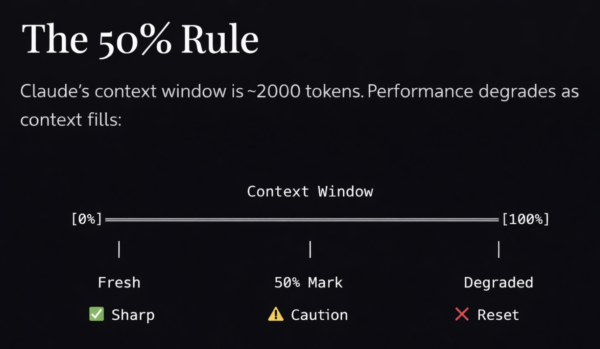
Best Practices:
- Start fresh sessions for new tasks
claude --session-id "auth-feature"
# Later
claude --resume auth-feature
- Use
/clearbetween unrelated tasks
> /clear
- Use
/compactwhen context grows
> /compact Focus on the GraphQL schema changes
- Delegate research to subagents
> Use a subagent to research how our caching layer works
- Name and organize sessions
> /rename auth-jwt-implementation
Context Degradation Signs
- Claude «forgets» earlier instructions
- Generated code quality declines
- Claude asks questions you already answered
- More errors and inconsistencies appear
Solution: Start fresh with a refined prompt incorporating what you learned.
CLI Reference and Essential Commands
Starting Claude Code
| Command | Description |
|---|---|
claude | Start interactive session |
claude "query" | Start with initial prompt |
claude -p "query" | Headless mode (pipe output) |
claude -c | Continue most recent conversation |
claude -r "name" | Resume named session |
claude --permission-mode plan | Start in Plan Mode |
Interactive Commands
| Command | Description |
|---|---|
/help | Show all commands |
/clear | Reset context |
/compact [focus] | Summarize context |
/rewind | Restore previous checkpoint |
/rename <name> | Name current session |
/resume | Session selector |
/mcp | MCP server status |
/permissions | Manage permissions |
/skills | List available skills |
Keyboard Shortcuts
| Shortcut | Action |
|---|---|
Shift+Tab | Cycle permission modes |
Esc | Stop Claude mid-action |
Esc Esc | Open rewind menu |
Ctrl+G | Open plan in editor |
Ctrl+O | Toggle verbose mode |
Option+T (Mac) | Toggle thinking mode |
Useful Flags
# Skip permissions (use carefully!)
claude --dangerously-skip-permissions
# Specify model
claude --model claude-sonnet-4-5-20250929
# Output format for scripts
claude -p "query" --output-format json
# Add working directories
claude --add-dir ../shared-lib
# Custom system prompt
claude --append-system-prompt "Always use TypeScript strict mode"
Tips and Tricks: Expert-Level Practices
1. AskUserQuestion for Deep Planning
Use this tool when planning. It's criminally underutilized.2. Don’t Obsess Over Tools
MCP, Skills, Plugins - they're fine, but won't fix a bad plan.
The SPECS is 90% of the work.
3. Build Without Ralph First
Gain experience. Understand the manual process before automating.
You need to know when Claude goes wrong to use Ralph effectively.
4. Context is King (50% Rule)
- Monitor context usage
- Clean up between unrelated tasks
- Use subagents for research
- Start fresh when quality drops
5. Be Bold
Software development is becoming easy.
Software engineering (architecture, UX, taste) is still hard.
That's your competitive advantage.
6. Let Claude Interview You
> Interview me about this feature using AskUserQuestion.
> Ask about edge cases, error handling, and tradeoffs.
> Be annoying. I'd rather answer 20 questions than rework the code.
7. Verify Everything
Always give Claude a way to verify its work:
- Test commands
- Expected outputs
- Screenshots for UI
- Lint checks
8. Course Correct Early
Esc → stops immediately
Esc Esc → rewind menu
"Undo that" → reverts changes
/clear → fresh start

Don't let bad code accumulate in the context.
Real-World Example: Express + GraphQL Backend
Let’s build a complete example step by step.
Step 1: Deep Planning Session
claude --permission-mode planI want to build a production-ready GraphQL API for a user management system.
Tech stack:
- TypeScript 5+
- Express.js
- Apollo Server
- PostgreSQL with native pg client
- Custom DI container for dependency injection
- Zod validation
- Authentication: jose (JWT), argon2 (password hashing)
- GraphQL: DataLoader (N+1), graphql-armor (security)
- Security: Helmet, CORS, express-rate-limit
- Logging: Pino
- Observability: OpenTelemetry, prom-client
- Jest + Supertest + Testcontainers for testing
Interview me using AskUserQuestion about:
1. Database schema design
2. Authentication flow (access/refresh tokens)
3. Authorization model (roles/permissions)
4. Error handling strategy
5. API versioning
6. Rate limiting
7. Logging and monitoring (distributed tracing)
8. Testing strategy (testcontainers for real DB)
9. Deployment considerations
Be thorough. Ask about tradeoffs. Challenge my assumptions.
Write the final specification in PRD.md.Step 2: Project Setup (Without Ralph)
# Exit plan mode, start normal session
claude
Let's start implementing our PRD.md. Begin with project setup:
1. Initialize npm project with TypeScript
2. Install dependencies from PRD.md tech stack
3. Configure tsconfig.json (strict mode)
4. Set up project structure as defined in PRD
5. Create basic Express server with health check
6. Add Jest configuration
After each step, verify with:
- npm run type-check
- npm run test
Show me the file structure when done.Step 3: Feature-by-Feature Implementation
Database Layer:
Implement the database layer:
1. Create SQL migrations in migrations/ (users, sessions tables)
2. Create TypeScript models in src/models/ (User, Session)
3. Set up pg connection pool in src/config/database.ts
4. Create and run initial migration
5. Write a simple integration test that creates and reads a user

Run the test to verify everything works.
Repository Layer (DI Pattern):
Now implement UserRepository in src/repositories/user.repository.ts:
- findById, findByEmail, create, update, delete methods
- Receive database pool and logger via constructor injection
- Register as singleton in src/container/index.ts
- Write integration tests using resolvers.db() from DI container

Run tests after implementation.
Service Layer (DI Pattern):
Implement AuthService in src/services/auth.service.ts:
- Receive UserRepository, Config, and Logger via constructor injection
- register(email, password) - create user, hash password
- login(email, password) - verify credentials, issue tokens
- refreshToken(token) - validate and issue new tokens

Register AuthService as singleton in src/container/index.ts.
Follow our error handling patterns from PRD.md.
Write unit tests with mocked dependencies via jest-mock-extended.
GraphQL Layer (Services via DI Context):
Set up Apollo Server with our auth schema:
1. Define schema with SDL in src/graphql/schema/
2. User type and queries (me, user, users)
3. Auth mutations (register, login, refreshToken)
4. Create GraphQL context that resolves services from DI container
5. Resolvers access services via context.services (injected from container)
6. Apollo Server plugin for logging and error handling
7. Auth middleware for protected routes

Write integration tests for GraphQL endpoints using resolvers from DI container.
Step 4: Verification and Documentation
Before finishing:
1. Run full test suite: npm run test
2. Run linting: npm run lint
3. Type check: npm run type-check
4. Generate API documentation
5. Update README with setup instructions
6. Create Dockerfile for deployment

Report any issues.
Remember: Models are good enough now. If your output is garbage, your input was garbage. Invest in planning.
Resources and Links
Official Documentation
- Claude Code Overview
- CLI Reference
- Best Practices
- Common Workflows
- Skills Documentation
- MCP Integration
- Hooks Guide
- Subagents
Video Reference
- Original Crash Course Video by Ross Mike
Related Tools
- Ghostty Terminal
- GitHub CLI (gh)
- Apollo Server
- DataLoader
- graphql-armor
- node-postgres (pg)
- Kysely
- argon2
- jose (JWT)
- Jest
- Testcontainers
- Supertest
- OpenTelemetry
- Pino
- Helmet
- express-rate-limit
- Zod
MCP Servers
Reference
Checklist
Before starting any project with Claude Code:
- ☐ Plan Deeply First: Use AskUserQuestion for thorough planning
- ☐ Create PRD.md: Document tech stack, architecture, features, constraints
- ☐ Set Up CLAUDE.md: Build commands, code style, testing instructions
- ☐ Build Feature by Feature: Implement → Test → Verify → Commit
- ☐ Monitor Context: Stay under 50%, clean up between tasks
- ☐ Verify Everything: Tests, lint, type-check at every step
- ☐ Document Progress: Keep progress.txt updated
- ☐ Only Then Consider Ralph: After you understand the manual process
Claude Code Native Tools Reference
Claude Code has access to a set of powerful built-in tools that help it understand and modify your codebase. These are the official native tools as documented in the Claude Code settings reference:
Complete Native Tools Table
| Tool | Description | Requires Permission |
|---|---|---|
AskUserQuestion | Asks multiple-choice questions to gather requirements or clarify ambiguity | No |
Bash | Executes shell commands in your environment | Yes |
TaskOutput | Retrieves output from a background task (bash shell or subagent) | No |
Edit | Makes targeted edits to specific files | Yes |
ExitPlanMode | Prompts the user to exit plan mode and start coding | Yes |
Glob | Finds files based on pattern matching | No |
Grep | Searches for patterns in file contents | No |
KillShell | Kills a running background bash shell by its ID | No |
MCPSearch | Searches for and loads MCP tools when tool search is enabled | No |
NotebookEdit | Modifies Jupyter notebook cells | Yes |
Read | Reads the contents of files | No |
Skill | Executes a skill within the main conversation | Yes |
Task | Runs a sub-agent to handle complex, multi-step tasks | No |
TaskCreate | Creates a new task in the task list | No |
TaskGet | Retrieves full details for a specific task | No |
TaskList | Lists all tasks with their current status | No |
TaskUpdate | Updates task status, dependencies, details, or deletes tasks | No |
WebFetch | Fetches content from a specified URL | Yes |
WebSearch | Performs web searches with domain filtering | Yes |
Write | Creates or overwrites files | Yes |
LSP | Code intelligence via language servers. Reports type errors and warnings automatically after file edits. Also supports navigation operations: jump to definitions, find references, get type info, list symbols, find implementations, trace call hierarchies. Requires a code intelligence plugin and its language server binary | No |
Source: Official Claude Code documentation – Settings: Tools available to Claude
Permission Rule Syntax
Permission rules follow the format Tool or Tool(specifier):
# Match all uses of a tool
Bash                        # All bash commands
WebFetch                    # All web fetch requests
Read                        # All file reads

# Fine-grained control with specifiers
Bash(npm run build)         # Exact command
Read(./.env)                # Specific file
WebFetch(domain:example.com) # Domain restriction

# Wildcards with *
Bash(npm run *)             # All npm run commands
Bash(git commit *)          # Git commits
Bash(* --version)           # Version checks
Claude Code Hook Lifecycle Reference
Claude Code hooks are user-defined shell commands that execute at various points in Claude Code’s lifecycle. Hooks provide deterministic control over Claude Code’s behavior, ensuring certain actions always happen.
Official Hook Lifecycle Table
| Hook Event | Trigger Point |
|---|---|
SessionStart | Session begins or resumes |
UserPromptSubmit | User submits a prompt |
PreToolUse | Before tool execution |
PermissionRequest | When permission dialog appears |
PostToolUse | After tool succeeds |
PostToolUseFailure | After tool fails |
SubagentStart | When spawning a subagent |
SubagentStop | When subagent finishes |
Stop | Claude finishes responding |
PreCompact | Before context compaction |
SessionEnd | Session terminates |
Notification | Claude Code sends notifications |
Setup | Invoked with --init, --init-only, or --maintenance flags |
Source: Official Claude Code documentation – Hooks Reference: Hook lifecycle
Hook Configuration Example
{
  "hooks": {
    "PreToolUse": [
      {
        "matcher": "Bash",
        "hooks": [
          {
            "type": "command",
            "command": "jq -r '.tool_input.command' >> ~/.claude/bash-log.txt"
          }
        ]
      }
    ],
    "PostToolUse": [
      {
        "matcher": "Edit|Write",
        "hooks": [
          {
            "type": "command",
            "command": "\$CLAUDE_PROJECT_DIR/.claude/hooks/auto-format.sh"
          }
        ]
      }
    ]
  }
}
Common Hook Use Cases
| Use Case | Hook Event | Example |
|---|---|---|
| Logging commands | PreToolUse → Bash | Log all bash commands executed |
| Auto-formatting | PostToolUse → Edit|Write | Run Prettier after file edits |
| Custom notifications | Notification | Desktop alerts for permission requests |
| File protection | PreToolUse → Edit|Write | Block edits to .env, secrets/ |
| Context injection | SessionStart | Load environment variables, project context |
| Cleanup | SessionEnd | Save session stats, run cleanup scripts |
Claude Code Sub-agents Reference
Sub-agents are specialized AI assistants that handle specific types of tasks. Each subagent runs in its own context window with a custom system prompt, specific tool access, and independent permissions.
Built-in Sub-agents
| Sub-agent | Model | Tools | Purpose |
|---|---|---|---|
| Explore | Haiku (fast) | Read-only (denied Write, Edit) | File discovery, code search, codebase exploration |
| Plan | Inherit | Read-only | Create execution plans, analyze requirements |
| General-purpose | Inherit | All tools | General task delegation |
Source: Official Claude Code documentation – Sub-agents: Built-in subagents
Custom Sub-agent Configuration
Sub-agents are defined in Markdown files with YAML frontmatter:
---
name: code-reviewer
description: Expert code review specialist. Use proactively after code changes.
tools: Read, Grep, Glob, Bash
model: sonnet
---
You are a senior code reviewer ensuring high standards of code quality and security.
When invoked:
1. Run git diff to see recent changes
2. Focus on modified files
3. Begin review immediately
Review checklist:
- Code is clear and readable
- Functions and variables are well-named
- Proper error handling
- No exposed secrets or API keys
Sub-agent Scope Locations
| Scope | Location | Priority | Use Case |
|---|---|---|---|
| CLI flag | --agents JSON | 1 (highest) | Quick testing, automation |
| Project | .claude/agents/ | 2 | Project-specific, shared via git |
| User | ~/.claude/agents/ | 3 | Personal, available across all projects |
| Plugin | Plugin’s agents/ directory | 4 (lowest) | Distributed with plugins |
Sub-agent Frontmatter Fields
| Field | Required | Description |
|---|---|---|
name | Yes | Unique identifier (lowercase, hyphens) |
description | Yes | When Claude should delegate to this subagent |
tools | No | Tools the subagent can use (inherits all if omitted) |
disallowedTools | No | Tools to deny |
model | No | sonnet, opus, haiku, or inherit |
permissionMode | No | default, acceptEdits, dontAsk, bypassPermissions, plan |
skills | No | Skills to load into context at startup |
hooks | No | Lifecycle hooks scoped to this subagent |
Recommended Sub-agents for This Project
1. Code Reviewer Sub-agent
---
name: code-reviewer
description: Reviews TypeScript/GraphQL code for quality and best practices. Use after any code changes.
tools: Read, Grep, Glob, Bash
model: sonnet
---
You are a TypeScript + GraphQL code reviewer. Focus on:
- Type safety and proper TypeScript usage
- GraphQL resolver patterns and DataLoader usage
- DI container patterns (constructor injection, no decorators)
- Error handling with custom error classes
- Security (input validation, SQL injection prevention)
After each review, provide:
1. Critical issues (must fix)
2. Warnings (should fix)
3. Suggestions (nice to have)
2. Test Writer Sub-agent
---
name: test-writer
description: Writes comprehensive tests for TypeScript code. Use when adding test coverage.
tools: Read, Write, Edit, Bash, Glob
model: sonnet
---
You are a testing expert for TypeScript + Jest + Supertest.
Test patterns to follow:
- Unit tests: Mock dependencies with jest-mock-extended
- Integration tests: Use Testcontainers for real PostgreSQL
- E2E tests: Full server bootstrap with Supertest
- Use Faker for realistic test data
Always structure tests as: Arrange → Act → Assert
Target 80%+ code coverage.
3. Debugger Sub-agent
---
name: debugger
description: Debugging specialist for errors, test failures, and unexpected behavior.
tools: Read, Edit, Bash, Grep, Glob
model: sonnet
---
You are an expert debugger for TypeScript + Node.js applications.
Debugging process:
1. Capture error message and stack trace
2. Identify reproduction steps
3. Isolate the failure location
4. Implement minimal fix
5. Verify solution works
For each issue, provide:
- Root cause explanation
- Evidence supporting the diagnosis
- Specific code fix
- Prevention recommendations
4. Database Query Expert
---
name: db-expert
description: PostgreSQL query expert. Use for database operations and optimizations.
tools: Bash, Read, Write
model: sonnet
hooks:
  PreToolUse:
    - matcher: "Bash"
      hooks:
        - type: command
          command: "\$CLAUDE_PROJECT_DIR/.claude/hooks/validate-sql.sh"
---
You are a PostgreSQL expert. Help with:
- Writing efficient SQL queries
- Creating migrations
- Query optimization
- Index recommendations
- Transaction handling
Always use parameterized queries to prevent SQL injection.
Recommended MCP Servers for This Project
Based on the tech stack (TypeScript + Express + GraphQL + PostgreSQL), here are the most relevant MCP servers:
Development & Version Control
| MCP Server | Command | Use Case |
|---|---|---|
| GitHub | claude mcp add --transport http github https://api.githubcopilot.com/mcp/ | PR reviews, issue management, code search |
| Linear | claude mcp add --transport http linear https://mcp.linear.app/mcp | Issue tracking, project management |
Database & Data
| MCP Server | Command | Use Case |
|---|---|---|
| PostgreSQL (via Bytebase) | claude mcp add --transport stdio db -- npx -y @bytebase/dbhub --dsn "postgresql://user:pass@host:5432/db" | Natural language database queries |
Monitoring & Debugging
| MCP Server | Command | Use Case |
|---|---|---|
| Sentry | claude mcp add --transport http sentry https://mcp.sentry.dev/mcp | Error monitoring, production debugging |
Documentation & Design
| MCP Server | Command | Use Case |
|---|---|---|
| Notion | claude mcp add --transport http notion https://mcp.notion.com/mcp | Documentation, knowledge base |
| Figma | claude mcp add --transport http figma https://mcp.figma.com/mcp | Design specs, UI/UX reference |
CI/CD & Deployment
| MCP Server | Command | Use Case |
|---|---|---|
| Netlify | claude mcp add --transport http netlify https://mcp.netlify.app/v1/mcp | Deployment management |
| Cloudflare | claude mcp add --transport http cloudflare https://bindings.mcp.cloudflare.com/mcp | Edge functions, DNS |
Project-Specific MCP Setup
Create .mcp.json in your project root for team-shared MCP configuration:
{
  "mcpServers": {
    "github": {
      "type": "http",
      "url": "https://api.githubcopilot.com/mcp/"
    },
    "sentry": {
      "type": "http",
      "url": "https://mcp.sentry.dev/mcp"
    },
    "database": {
      "type": "stdio",
      "command": "npx",
      "args": ["-y", "@bytebase/dbhub", "--dsn", "\${DATABASE_URL}"]
    }
  }
}
MCP Best Practices
- Use project scope for team-shared servers:
claude mcp add --scope project ... - Use user scope for personal tools:
claude mcp add --scope user ... - Authenticate via
/mcpcommand for OAuth-based servers - Set timeout for slow servers:
MCP_TIMEOUT=10000 claude - Monitor output limits:
MAX_MCP_OUTPUT_TOKENS=50000for large outputs
Source: Official Claude Code documentation – Connect Claude Code to tools via MCP