
Filesystem Parallelism for AI Agents
Git worktrees are evolving from a niche feature into an essential primitive for agent-assisted development. They provide filesystem-level parallelism, allowing agentic coding tools to operate concurrently on separate branches, builds, or refactors without sharing a mutable working directory.
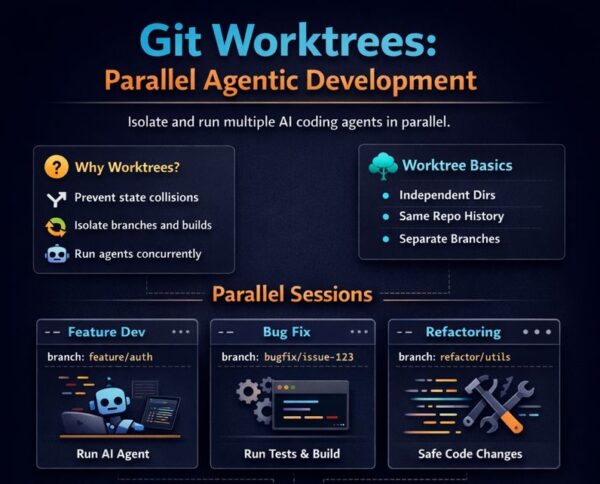
Why Worktrees Matter Now
Modern AI Coding Assistants are becoming increasingly autonomous. They don’t just suggest completions; they execute multi-step plans, run terminal commands, modify multiple files, and orchestrate entire workflows.
This autonomy creates a new problem: mutable state collision.
When you have multiple AI agents (or one agent handling multiple tasks), they all want to:
- Modify files in your working directory.
- Run builds and tests.
- Switch branches for different features.
- Make commits.
Without isolation, these operations interfere with each other and with your own work.
Git worktrees solve this elegantly. Each worktree is a separate working directory linked to the same repository. Same Git history, same remotes, same branches but isolated filesystems.
Workspace Setup
Throughout this guide, I will use ~/projects as the workspace root. This is a clean, predictable location for managing multiple repos and their worktrees.
# Create your workspace
mkdir -p ~/projects
cd ~/projects
Clone the Repository
# Clone the main repository
git clone https://github.com/cli/cli.git
# Output:
# Cloning into 'cli'...
# remote: Enumerating objects: 79258, done.
# remote: Total 79258 (delta 0), reused 0 (delta 0), pack-reused 79258 (from 1)
# Receiving objects: 100% (79258/79258), 72.39 MiB | 6.05 MiB/s, done.
# Resolving deltas: 100% (54431/54431), done.

cd cli

# Verify you're in the right place
pwd
# Output: ~projects/cli
Worktree Fundamentals
Understanding Worktrees
A Git worktree is a linked working directory that shares the same .git data with your main repo. Think of it as a «view» into your repository at a specific branch.
# View current worktrees (every repo starts with one)
git worktree list

# Output:
# ~/projects/cli  cf53b76d7 [trunk]
Creating Your First Worktree
# Create a worktree for a new feature branch
git worktree add ../cli-feature-auth -b feature/auth
# Output:
# Preparing worktree (new branch 'feature/auth')
# HEAD is now at cf53b76d7 Merge pull request #12354 from cli/dependabot/github_actions/goreleaser/goreleaser-action-6.4.0

# Breakdown:
#   ../cli-feature-auth  → Directory path (sibling to main repo)
#   -b feature/auth       → Create and checkout new branch
Your filesystem now looks like:
~/projects/
├── cli/                  # Main worktree (trunk branch)
│   ├── .git/
│   ├── cmd/              # Main packages (gh executable)
│   ├── pkg/              # Command implementations
│   ├── internal/         # Internal packages
│   ├── api/              # GitHub API utilities
│   ├── go.mod            # Go module file
│   └── Makefile
└── cli-feature-auth/     # Feature worktree (feature/auth branch)
    ├── .git -> ../cli/.git/worktrees/cli-feature-auth
    ├── cmd/
    ├── pkg/
    ├── internal/
    ├── api/
    ├── go.mod
    └── Makefile

# Verify with: ls -la ~/projects/
# drwxr-xr-x  cli
# drwxr-xr-x  cli-feature-auth
Working with Existing Branches
# Create worktree from existing remote branch
git worktree add ../cli-bugfix-123 origin/bugfix/issue-123

# Create worktree from a specific commit
git worktree add ../cli-v2-review v2.0.0
Parallel Agent Sessions
The real power of worktrees emerges when running multiple AI coding sessions simultaneously.
Terminal-Based Parallel Sessions
Each terminal window operates in an isolated worktree:
Terminal 1 — Feature Development:
cd ~/projects/cli-feature-auth

# Check current branch and status
git status
# Output: On branch feature/auth
#         nothing to commit, working tree clean

git branch
# Output:
# * feature/auth
# + trunk

# Run your AI coding agent of choice in this isolated directory
# The agent operates on feature/auth branch without affecting trunk
Terminal 2 — Bug Fix:
cd ~/projects/cli-bugfix-123

# Different branch, different working directory
git log --oneline -5
git diff HEAD~1

# Run builds and tests independently
make test
Terminal 3 — Refactoring:
cd ~/projects/cli-refactor-utils

# Safe to run destructive operations
make build
make lint
git diff
Each worktree session has:
- Its own file state.
- Independent terminal context.
- Isolated build artifacts.
- No interference with other sessions.
Automated Worktree Creation for Agents
You can script worktree creation for agent workflows:
#!/bin/bash
# create-agent-worktree.sh

BRANCH_NAME=$1
WORKTREE_NAME="cli-${BRANCH_NAME}"

cd ~/projects/cli

# Create worktree with new branch
git worktree add "../${WORKTREE_NAME}" -b "$BRANCH_NAME"

# Initialize environment (Go project - dependencies fetched at build time)
cd "../${WORKTREE_NAME}"
make build

echo "Worktree ready at ~/projects/${WORKTREE_NAME}"
echo "Branch: ${BRANCH_NAME}"
Usage:
chmod +x create-agent-worktree.sh
./create-agent-worktree.sh feature/new-auth
Key Benefit: You continue working in your main workspace while agents operate in isolated worktrees.
Managing Work Across Worktrees
Tracking Active Worktrees
cd ~/projects/cli

# List all worktrees with their branches
git worktree list

# Output:
# ~/projects/cli               cf53b76d7 [trunk]
# ~/projects/cli-feature-auth  cf53b76d7 [feature/auth]
# ~/projects/cli-bugfix-123    cf53b76d7 [bugfix/issue-123]
Monitoring Changes Across Worktrees
# Check status in all worktrees from main repo
for wt in $(git worktree list --porcelain | grep worktree | cut -d' ' -f2); do
  echo "=== $wt ==="
  git -C "$wt" status --short
done

# Output (empty status means clean working tree):
# === ~projects/cli ===
# === ~projects/cli-feature-a ===
# === ~projects/cli-feature-auth ===
# === ~projects/cli-feature-b ===
# === ~projects/cli-feature-c ===
Branch Navigation
# See which branches are checked out where
git worktree list
# Output:
# ~projects/cli               cf53b76d7 [trunk]
# ~projects/cli-feature-auth  cf53b76d7 [feature/auth]

# View commits unique to a worktree branch
git log trunk..feature/auth --oneline
# Output: (empty if no commits have been made on the branch yet)

# View recent commits on trunk
git log --oneline -10
# Output:
# cf53b76d7 (HEAD -> trunk, origin/trunk, ...) Merge pull request #12354...
# 09e66252f chore(deps): bump goreleaser/goreleaser-action from 6.0.0 to 6.4.0
# c8335e3f5 Merge pull request #12315...
# ...
Practical Workflows
Workflow 1: Parallel Feature Development
cd ~/projects/cli

# Create worktrees for three parallel features
git worktree add ../cli-feature-a -b feature/user-dashboard
git worktree add ../cli-feature-b -b feature/notification-system
git worktree add ../cli-feature-c -b feature/analytics-module

# List all worktrees
git worktree list

# Output:
# ~/projects/cli               cf53b76d7 [trunk]
# ~/projects/cli-feature-a     cf53b76d7 [feature/user-dashboard]
# ~/projects/cli-feature-b     cf53b76d7 [feature/notification-system]
# ~/projects/cli-feature-c     cf53b76d7 [feature/analytics-module]
Now open three terminal tabs/windows for parallel work:
# Tab 1: User Dashboard
cd ~/projects/cli-feature-a
make build
git status

# Tab 2: Notification System
cd ~/projects/cli-feature-b
make build
git status

# Tab 3: Analytics Module
cd ~/projects/cli-feature-c
make build
git status
Each terminal now has an isolated environment ready for an AI agent or manual development.
Workflow 2: Code Review in Isolation
# Create worktree to review a PR without affecting your work
git fetch origin pull/42/head:pr-42
git worktree add ../cli-review-pr42 pr-42

cd ../cli-review-pr42

# Review the changes
git log --oneline -10
git diff trunk...pr-42 --stat
git diff trunk...pr-42

# Run tests on the PR code
make build
make test

# Check for issues
make lint
Workflow 3: Safe Refactoring in Isolation
# Create isolated worktree for major refactor
git worktree add ../cli-refactor-v2 -b refactor/v2-architecture

cd ../cli-refactor-v2

# Analyze current state before changes
find pkg/cmd -name "*.go" | head -20
# Output:
# pkg/cmd/codespace/ssh_test.go
# pkg/cmd/codespace/create.go
# pkg/cmd/codespace/select_test.go
# pkg/cmd/codespace/list.go
# ... (more files)

grep -r "authentication" internal/ --include="*.go" -l
# Output:
# internal/prompter/accessible_prompter_test.go
# internal/prompter/prompter.go
# internal/gh/gh.go
# internal/config/config.go
# internal/codespaces/rpc/invoker.go
# internal/run/stub.go

find . -name "*.go" | xargs wc -l | tail -1
# Output: 212847 total

# Initialize environment
make build

# Make changes safely - main workspace is unaffected
make build
make test

# Commit incrementally
git add -p
git commit -m "refactor: initial auth module restructure"
Workflow 4: CI/CD Testing Matrix
# Create worktrees for testing against different Go versions
git worktree add ../cli-test-go121 -b test/go-1.21
git worktree add ../cli-test-go122 -b test/go-1.22
git worktree add ../cli-test-go123 -b test/go-1.23

# In each worktree, run builds with different environments
cd ~/projects/cli-test-go121
go version  # Verify Go version
make build && make test

cd ~/projects/cli-test-go122
go version
make build && make test

# etc.
Worktree Lifecycle Management
Listing Worktrees
cd ~/projects/cli
git worktree list

# Verbose/machine-readable output
git worktree list --porcelain
# Output:
# worktree ~projects/cli
# HEAD cf53b76d71a8e26dd3f1e0106d6287e57592eaac
# branch refs/heads/trunk
#
# worktree ~projects/cli-feature-auth
# HEAD cf53b76d71a8e26dd3f1e0106d6287e57592eaac
# branch refs/heads/feature/auth
Removing Worktrees
# Remove a worktree (keeps the branch)
git worktree remove ../cli-feature-auth

# Force remove (if there are uncommitted changes)
git worktree remove --force ../cli-feature-auth

# Prune stale worktree references
git worktree prune

# Verify removal
git worktree list
# Output: ~projects/cli  cf53b76d7 [trunk]

# Note: Branches still exist after worktree removal
git branch
# Output:
#   feature/auth
# * trunk

# Delete branches when done
git branch -d feature/auth
# Output: Deleted branch feature/auth (was cf53b76d7).
Locking Worktrees
Prevent accidental removal during long-running operations:
# Lock a worktree
git worktree lock ../cli-feature-auth --reason "Agent running multi-day refactor"

# Verify the lock (shows in porcelain output)
git worktree list --porcelain | grep -A3 "cli-feature-auth"
# Output:
# worktree ~projects/cli-feature-auth
# HEAD cf53b76d71a8e26dd3f1e0106d6287e57592eaac
# branch refs/heads/feature/auth
# locked Agent running multi-day refactor

# Unlock when done
git worktree unlock ../cli-feature-auth
Unix Utilities for Worktree Management
Powerful shell commands for managing worktrees at scale:
Batch Operations Across Worktrees
# Run a command in all worktrees
for wt in $(git worktree list --porcelain | grep worktree | cut -d' ' -f2); do
  echo "=== Running in $wt ==="
  (cd "$wt" && make test)
done

# Example output header:
# === Running in ~projects/cli ===
# === Running in ~projects/cli-feature-auth ===
# (test output follows for each worktree)
Status Dashboard
# Create a worktree status report
git worktree list --porcelain | grep -E "worktree|branch" | paste - - | \
  awk '{print $2, $4}' | column -t

# Output:
# ~projects/cli               refs/heads/trunk
# ~projects/cli-feature-a     refs/heads/feature/user-dashboard
# ~projects/cli-feature-auth  refs/heads/feature/auth
# ~projects/cli-feature-b     refs/heads/feature/notification-system
# ~projects/cli-feature-c     refs/heads/feature/analytics-module
Automated Cleanup Script
#!/bin/bash
# cleanup-merged-worktrees.sh

cd ~/projects/cli

# Find worktrees with branches already merged to trunk
for wt in $(git worktree list --porcelain | grep worktree | cut -d' ' -f2); do
  branch=$(git -C "$wt" branch --show-current)
  if [ "$branch" != "trunk" ]; then
    # Check if branch is merged
    if git branch --merged trunk | grep -q "$branch"; then
      echo "Worktree $wt (branch: $branch) is merged and can be removed"
    fi
  fi
done
Diff Across Worktrees
# Compare changes between two worktrees
diff -rq ~/projects/cli-feature-a/src ~/projects/cli-feature-b/src

# Or using git
git diff feature/user-dashboard..feature/notification-system -- src/
Merging Worktree Changes
When your agent completes work in a worktree, integrate changes back:
Standard Merge
cd ~/projects/cli
git merge feature/auth

# Or with a squash for cleaner history
git merge --squash feature/auth
git commit -m "feat: add OAuth2 authentication"
Cherry-Pick Specific Commits
cd ~/projects/cli
git cherry-pick abc1234 def5678
Rebase for Linear History
cd ~/projects/cli-feature-auth
git rebase trunk

# Then merge as fast-forward
cd ~/projects/cli
git merge feature/auth
Troubleshooting
«Branch is already checked out»
# Error: fatal: 'feature/auth' is already checked out at '/path/to/worktree'

# Solution: Each branch can only be checked out in one worktree
git worktree list  # Find where it's checked out
Stale Worktree References
# If a worktree directory was deleted manually
git worktree prune

# Verify
git worktree list
Worktree Has Uncommitted Changes
# Option 1: Commit or stash in the worktree first
cd ~/projects/cli-feature-auth
git stash

# Option 2: Force remove (loses changes!)
git worktree remove --force ../cli-feature-auth
Identifying Which Worktree You’re In
# Show current worktree and branch
git rev-parse --show-toplevel
# Output: ~projects/cli-feature-auth

git branch --show-current
# Output: feature/auth

# Add to your shell prompt (bash/zsh)
# In ~/.bashrc or ~/.zshrc:
export PS1='\w ($(git branch --show-current 2>/dev/null)) $ '
Best Practices Summary
| Practice | Rationale |
|---|---|
| Use sibling directories | ../project-feature-x keeps worktrees organized alongside main repo |
| Name worktrees descriptively | cli-feature-auth is clearer than wt1 |
| Lock long-running worktrees | Prevents accidental removal during agent operations |
| Clean up finished worktrees | git worktree remove + git worktree prune |
Use .gitignore for build artifacts | Keep worktrees clean with proper ignore patterns |
| Commit frequently in worktrees | Small commits make it easier to cherry-pick or review |
| Script repetitive operations | Automate worktree creation and environment setup |
The Agentic Future
- Isolated state: No file conflicts between agents.
- Deterministic context: Each agent sees a consistent snapshot.
- Safe concurrency: Parallel execution without coordination overhead.
As AI coding assistants become more capable—running for hours, making hundreds of file changes, executing complex multi-step plans—worktrees become not just useful, but essential.
They’re the filesystem primitive that makes agentic parallelism practical.
Quick Reference
# === WORKTREE CREATION ===
git worktree add ../path -b branch-name     # New branch
git worktree add ../path existing-branch    # Existing branch
git worktree add ../path HEAD~5             # From specific commit

# === WORKTREE MANAGEMENT ===
git worktree list                           # List all worktrees
git worktree list --porcelain               # Machine-readable output
git worktree remove ../path                 # Remove worktree (keeps branch)
git worktree remove --force ../path         # Force remove
git worktree prune                          # Clean stale references
git worktree lock ../path --reason "msg"    # Prevent removal
git worktree unlock ../path                 # Allow removal

# === NAVIGATION ===
cd ~/projects/cli-feature-x                # Enter worktree
git rev-parse --show-toplevel               # Show worktree root
git branch --show-current                   # Show current branch

# === CROSS-WORKTREE OPERATIONS ===
git -C ../cli-feature-a status             # Status in another worktree
# Output: On branch feature/user-dashboard
#         nothing to commit, working tree clean
git diff trunk..feature/auth                 # Compare branches
git log trunk..feature/auth --oneline        # Commits unique to branch (empty if no commits)

# === MERGING ===
git merge feature/auth                      # Standard merge
git merge --squash feature/auth             # Squash merge
git cherry-pick abc1234                     # Cherry-pick commit
Minor Caveats / Nitpicks
Not every AI tool needs/uses worktrees natively.
- VS Code Copilot agents (background agents) do not automatically create worktrees. Plain Copilot Chat usually doesn’t.
- Cursor does; many Claude Code users do manually.
- In practice people also mention: Disk usage still grows (full working dirs × number of worktrees).
- Dependency duplication (node_modules, vendor/, venv) can be painful on large projects.
- IDEs sometimes get confused if you open many worktrees at once.
- git worktree UX is still regarded as a bit raw → hence all the wrapper CLIs/tools that appeared in 2025.
- Some very heavy build toolchains dislike multiple checkouts on the same machine (resource contention).
I am not saying «initialize every environment per worktree», but you should know the pattern isn’t zero-cost magic.
Walkthrough Progress Summary
This guide was validated through a complete hands-on walkthrough on January 24, 2026 using the GitHub CLI repository (cli/cli).
| Section | Commands |
|---|---|
| ✅ Workspace Setup | mkdir -p ~/projects, git clone |
| ✅ Worktree Fundamentals | git worktree list, git worktree add |
| ✅ Parallel Feature Development | Created 4 feature worktrees |
| ✅ Worktree Lifecycle | lock, unlock, remove, prune |
| ✅ Status Dashboard | Batch status across worktrees |
| ✅ Cross-worktree Operations | git -C commands |
| ✅ Safe Refactoring Workflow | find, grep, code analysis (212,847 lines of Go) |
| ✅ Branch Navigation | git log, git diff between branches |
| ✅ Cleanup | Remove worktrees + delete branches |
| ⏭️ Build/Test | make build, make test |
Commands Executed
# Workspace setup
mkdir -p ~/projects
cd ~/projects
git clone https://github.com/cli/cli.git

# Worktree creation
git worktree add ../cli-feature-auth -b feature/auth
git worktree add ../cli-feature-a -b feature/user-dashboard
git worktree add ../cli-feature-b -b feature/notification-system
git worktree add ../cli-feature-c -b feature/analytics-module
git worktree add ../cli-refactor-v2 -b refactor/v2-architecture

# Worktree management
git worktree list
git worktree list --porcelain
git worktree lock ../cli-feature-auth --reason "Agent running multi-day refactor"
git worktree unlock ../cli-feature-auth

# Cross-worktree operations
git -C ../cli-feature-a status
git log trunk..feature/auth --oneline
git rev-parse --show-toplevel
git branch --show-current

# Status dashboard
git worktree list --porcelain | grep -E "worktree|branch" | paste - - | awk '{print $2, $4}' | column -t
for wt in $(git worktree list --porcelain | grep worktree | cut -d' ' -f2); do echo "=== $wt ==="; git -C "$wt" status --short; done

# Code analysis in refactor worktree
find pkg/cmd -name "*.go" | head -20
grep -r "authentication" internal/ --include="*.go" -l
find . -name "*.go" | xargs wc -l | tail -1

# Cleanup
git worktree remove ../cli-feature-a
git worktree remove ../cli-feature-auth
git worktree remove ../cli-feature-b
git worktree remove ../cli-feature-c
git worktree remove ../cli-refactor-v2
git worktree prune
git branch -d feature/analytics-module feature/auth feature/notification-system feature/user-dashboard refactor/v2-architecture
Final State
~/projects/
├── cli/        [trunk] ← Clean main repo (cf53b76d7)
└── README.md
All worktrees removed, all feature branches deleted, repository returned to clean state.
Git worktrees have been around since Git 2.5, but their moment is now. In an era of agentic development, they’re the primitive that makes parallelism safe.